Showing posts with label help. Show all posts

Thursday, 1 February 2024

The Best UX/UI Designer Tools, Resources, Blogs & Books Collection

Editors note: The following article was updated on March, 2024, to offer relevant information about available UI/UX design resources and blogs.


It can be intimidating to get into user experience, but don’t fear: there’s plenty of help around. To help you navigate that sea of information, we make a cool list to share with you. This list covers UX/UI blogs, resources, books and tools (in no particular order). I hope it will help you guys to get better at what you’re doing!

UX Blogs and Resources


1. Awwwards -A place to find inspiration and talent; a space for debate; a place to share knowledge and experience.

2. UX Magazine -This site creates a community with location-based listings for conferences, jobs, workshops, informal meetups, and classes.

3. UX Myths -Collects the most frequent user experience misconceptions and explains why they don’t hold true.

4. Designer News -Best UX/UI related articles collection.

5. Usability Geek -A wider array of topics that extend beyond usability, such as User Experience (UX), conversion, Human Computer Interaction (HCI) and Information Architecture (IA).

6. Lukew -A Product Director at Google shares his views on Web and device strategy, interaction design, visual design, usability, and much more.

7. UXness - A The UXness Blog is your portal to a richer understanding of User Experience (UX) design. It's a treasure trove of insightful articles that dissect key topics like: UX fundamentals, Emerging UX trends, Practical UX design tips and tricks, Inspiring UX case studies, UX events, UX Tools, UX Books and UX principles and laws etc. UXness is a community of 35K+ UX enthusiasts connect across the globe and have ~2K daily article reads.

8. Design Talks -545 Talks for Designers from 68 UX/UI conferences all over the world.

9. HelloErik Experience Design -The design and experience blog of Erik Flowers.

10. Weeklypixels -Reviews on design Books, user experience books, UX processes, graphic design books, typography books, lettering books.

11. UX Booth -Feature content on analytics, content strategy, information architecture, interaction design, philosophy, research, universal design and accessibility.

12. Mockplus Blog -The newest UX/UI design resources recommended for UX and UI designers.

13. Smashing Magazine’s UX Design Category -UX/UI experts share with you their valuable ideas, practical tips, useful guidelines, recommended best practices and great case studies.

14. Design Shack -Showcases inspiring examples of design, alongside resources and articles.

15. Creative Bloq -It is a high volume blog for creatives that features content on web design, illustration, graphic design, 3d, digital art, and more.

16. Beautiful Pixels -Showcases some of the best examples iOS and Android apps as well as UI design across various types of media

17. UX Movement -Publish articles showing how good and bad interface design practices affect user behavior.

18. DesignModo UX -Resource for both beginners and advanced designers looking to expand and improve their knowledge.

19. 1stwebdesigner -Post the latest design resource for UX/UI designers.

20. Noupe -Feature content on responsive design, UX/UI, web development, inspiration and more.

21. Six Revisions -Publish articles, guides, tutorials, news and other forms of content for people who design and build sites and apps.

22. Speckyboy -Fresh and useful resources and inspirational art, covering web design and development, graphic design, mobile development.

23. Designzzz -Offers free and useful resources for designers and developers.

24. Vandelay Design -Post creative bouts of inspiration that we all need for success.

25. Boxes and Arrows -The practice, innovation, and discussion of design.

26. InspirationFeed -You’ll find industry guidelines, case studies, design & development resources, tips & tricks, and other related web articles here.

27. Usabilla Blog -Useful UX articles or designers.

28. Dribbble -An online community for showcasing user-made artwork.

29. Behance -Showcase and discover the latest work from top online portfolios by creative professionals across industries.

30. NN/g -A leading voice in the user experience field.


Free UX & UI Books


Click here for more details about these UX books.

We hope you enjoyed getting to know about these design resource and tools. Hopefully, through them, your journey of being a UX or UI becomes easier!


About Author

Becky
Email: becky@jongde.com


Share:
Continue Reading →

Tuesday, 3 November 2015

15 tips to Improve Usability of Web forms Part 1

Almost every website contains at least 1 form. It can be a simple login form to a very complex Income tax return form. A form on a web page usually comprises a set of input fields for the user to fill in and submit to the website. In simple language a user or human interacts with form and submits some information. Forms play an important role in user experience and also decides conversion or success of your website. We all have faced frustrations while using some forms in our life and that bad experience affects the brand identity of website owner/company. So it is very necessary to design better, easy, helpful and user friendly forms. Presenting some suggestions for making forms more Usable below.

Tips for Improving Usability of FORMS

#1. Group the form fields logically

Categorize the form fields in logical groups, this reduces cognitive load and user understand forms easily.

#2. Make labels visible

It is a good practice to make 'Labels/titles' always visible for user. It improves association and this information is really important for a user.


#3. Action buttons should be labeled in verbs

Every form has some intention or motive. That motive or goal of a form can be called 'Verb' of a form. Ex. a form for booking movie ticket online will have 'Verb' as 'Book ticket'. Always label primary action buttons as 'Verb' of that form. This reduces cognitive process and makes decision making more stronger. Specially in confirmation messages (pop-ups) use 'verb' in action buttons.

#4. Provide suggested text to help user

If possible, show the suggestions or contextual help to user. It can increase efficiency of form submission and also reduces the chances of errors.


#5. Show info and tips along with fields

For complex and difficult form fields show the Tip/information along with fields. It helps user in understanding about fields and makes form more user friendly.

#6. Using wizards for simplifying forms

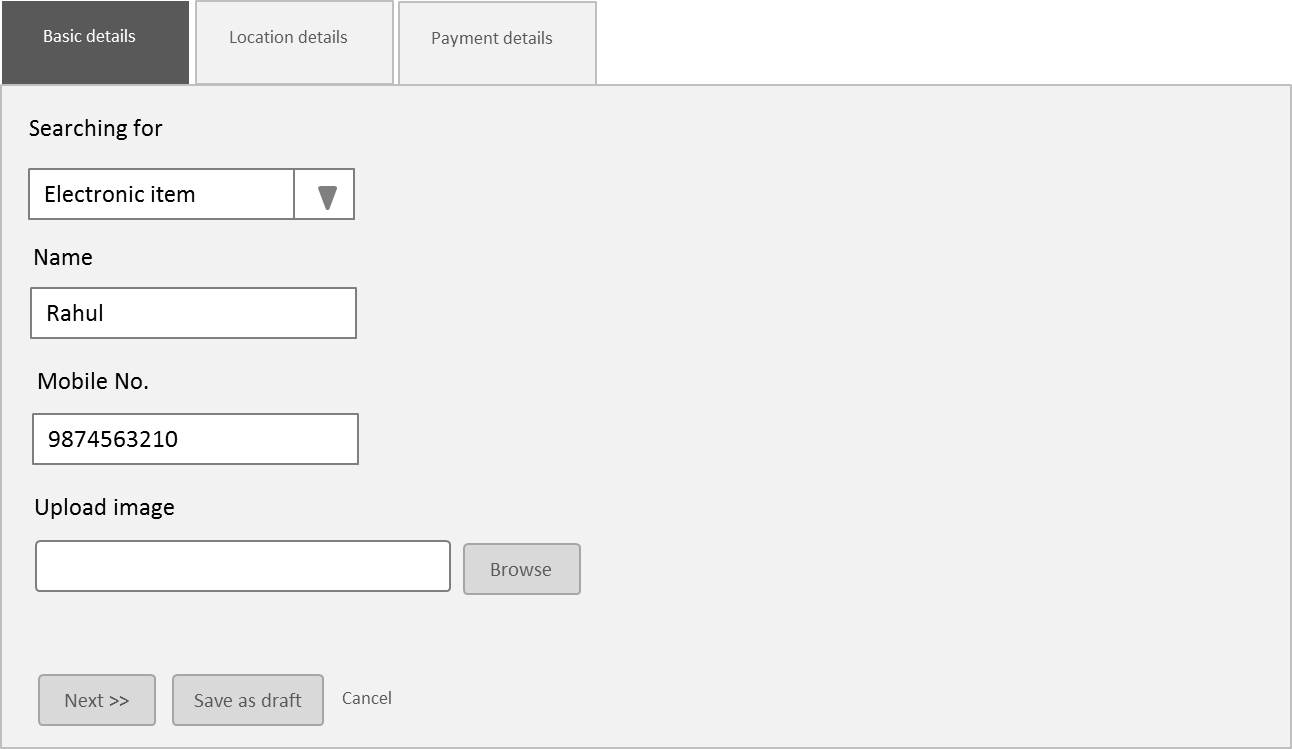
Break the complex and lengthy form in simple and short steps for the ease of user. Use step wizards for simplifying complex form. This makes user's life easier and less load on him/her while filling form.

#7. Increase the affordance of primary actions

Separate the primary actions with secondary action buttons by increasing affordance of primary actions. It reduces the probability of accidentally hitting wrong button and getting data lost.

#8. Don't ask for unnecessary info.

Don't increase form by asking some unnecessary information from user. Optimization of form fields is the first step in improving form usability.

Tip #9 to #15 -  15 tips to Improve Usability of Web forms Part 2

Author: Abhishek Jain (@uxdabhi)
Share:
Continue Reading →

Tuesday, 13 January 2015

Tips and Tours in Websites Part-2

In previous article we have seen how to make ‘Tips’ more usable and accurate in any websites. In this article we are going to talk about ‘Tours’ a new promotion style in digital media trend and websites.
Now, what is ‘tours’? Where to use it? Why to use it? How to use it? many questions come in a UXdesigners mind. ‘Tours’ are the simply a story or summary of new updates, promotion, interesting facts, new features, new changes etc. in any websites. With the help of a ‘Tour’ you can make a user aware about these things in a form of a journey.
Tours 2
‘Tours’ are new and trending feature in digital media and websites. It is good for a UXdesigner to design ‘tip-Tours’ for their websites at respective places but most important thing is to learn how to make it more interesting and engaging. In ‘Tours’ if you are talking about new features or new updates then you have to think to make it pleasing. It should give a feeling of ‘gifting’ ‘getting’ , like that new feature is going to be a gift for users.
Tours
Below are some points to make your ‘Tip-Tours’ usable and accurate.
1. At the start and once: ‘Tours’ should come at the beginning of an application. When user is starting his/her activity in any website show  ‘Tour’ and only for once. If you show the ‘Tours’ more times then it will irritate users.
2. Feeling of awesome is required: Don’t forget you are showing a thing (Tour) which a user has not expected, so it should not be boring and bad. When any user interacts with your ‘Tour’ he/she should get awesome feeling. Present the information in creative and attractive way. Short description with images or show the information in Infographics.
3. Show simple and short story, not make it a novel: Story of ‘Tours’ should be short and engaging, don’t write everything in tips. At a time show 2-3 slides in any ‘tour’ of very important and interesting thing.
4. Show Status: Show the count of ‘Tour’ slides and status of ‘Tours’ clearly.
5. Quick exit: Don’t make user to be mandate to view your ‘Tours’, always provide a quick exit.


Share:
Continue Reading →

Saturday, 3 January 2015

Tips and Tours in websites Part-1

‘Tips and tours’ are used to educate users about new changes or updates in any website or application. Specially these are very useful in ‘Promoting’ any new feature in any website. Tips are one type of inline help. There are some points which a UXdesigner or Analyst should keep in mind while designing ‘Tips and Tours’ in any websites or web applications.
Picture3
This article is based on ‘Tips’ and in next article we are going to learn about ‘Tours’.
1. ‘Tips’ should not irritate a user. Show the tips for 1 or 2 times only (based upon the webapp/site).
2. ‘Tips’ are for special feature of any website, are for new or updated feature, are for simplifying any complex feature. Do not show unnecessary tips for feature. Unnecessary tips leads to user irritation.
3. No. of tips should not more than 3-4 per screen (recommended count for better experience). Not show too many tips in websites, let users do their work for which they came on your site.
4. Always show easy exit for a user from tips.
5. Write tips in easy and simple language. Tips are for making users life easy by helping them, it should not make user’s life complex.
6. Always show the count of total ‘tips’ to user.
7. Align ‘Tips’ with the new feature placement. Tips arrow head should point towards new feature. (Increases findability and more impactful effect).
 Picture5                                                                                                      
Picture4      

Picture6
  Picture3
Tips are the very useful and important UI element for helping users and making their life easier.

Suggested Reading: Tips and Tours in websites Part-2 >>
Share:
Continue Reading →