Showing posts with label UX model. Show all posts

Friday, 15 May 2020

Understand and Apply Lean UX approaches for Agile environments


Agile development methods, such as Scrum, have challenged UX experts to adapt. In this article, we will study lean UX and the way to practice Lean UX principles and methodologies inside Agile environments and efficaciously work with teams. This article is just an overview on Lean UX and its adaption in agile environment. If you want to gain in-depth knowledge on this topic, I highly suggest you to read Lean UX if you haven’t yet.
 

What is Lean UX

Lean User Experience (Lean UX) design is a design management mindset, culture, and a framework that embraces Lean-Agile strategies. It implements functional capability in minimum viable progression and determines victory by measuring results against a hypothesis. Lean UX design extends the traditional UX position past simply designing elements and foreshadowing how users might interact with a system. Rather, it encourages a far more comprehensive view of why a feature exists, the functionality required to enforce it, and the advantages it delivers.

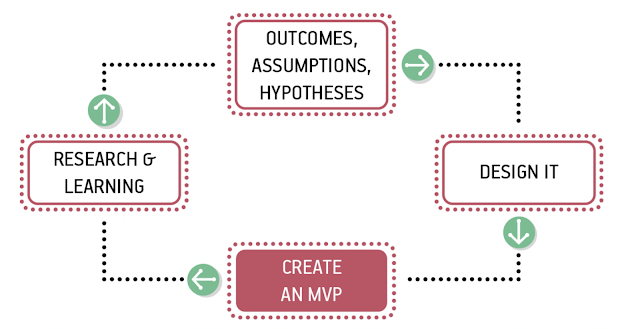
In Lean UX: Designing Great Products with Agile Teams, Gothelf and Seiden [1] describe a model that we have adapted to our context, as Figure 1 illustrates.

The Lean UX Process

Figure 1 The Lean UX Process (adapted from Ref [1])


The book also lists the foundation for precise methods in which groups cope with their UX process, and introduced a system that emphasizes the following:

1.    Removing waste
The system seeks to cut through common, time-consuming tactics like frequent documentation by creating minimal viable products that drive learning quickly.

2.    Constant collaboration
Lean UX brings together teams from “designers, developers, product managers, quality assurance engineers, marketers, and others” through frequent contact and communication. - Lean UX

3.    More experimentation
Designers leverage rapid experimentation with their designs to uncover more grounded information and lessons on their products. - Lean UX

3 Months free Interaction Design Foundation

 “This reframing requires an organization-wide position of humility. It requires teams and managers to use their knowledge and skills and creativity as scientists might: they propose their best solution and then they test to see if they’re right.” – Lean UX

For a design management mindset to be effective all members of your organization need to be on board and understand Lean UX for it to be effective. The core of Lean UX boils done to the following principles:


Outcomes, Assumptions, and Hypotheses

The Lean UX technique starts with writing a hypothesis: Agile teams and designers apply Agile methods to keep away from Big Design Up-front (BDUF) and focuses on creating a hypothesis about the feature’s anticipated business result, and then implement and test that hypothesis gradually. Where maximum software creation teams focus on features and deliverables, Lean UX shows a light on the outcomes of the product and how they benefit (or don’t benefit) the user in an incremental manner.

This includes turning your assumptions into hypotheses statements. For example:
We believe are users are service Engineers who don’t need any technical help/support with managing our HVAC system. We will know we’re right if we see a decrease or clearly no service related queries over any communication platform.


Collaborative Design

Traditionally, product success was measured by how well the executed user interface complied with the initial UX design. In Lean UX, this changes adequately: “Lean UX literally has no time for heroes. The entire concept of design as a hypothesis immediately dethrones notions of heroism; as a designer, you must expect that many of your ideas will fail in testing. Heroes don’t admit failure. But Lean UX designers embrace it as part of the process.” – Lean UX

Continuous observation and scrutiny takes the hypothesis and expedite a continuous and collaborative process that ask input from a numerous group of stakeholders – Architects, Customers, Business Owners, Product Owners, and Agile Teams. This further refines the problem and creates design that clearly express the emerging understanding including personas, empathy maps, and customer experience maps. This significantly improves business outcomes and time-to-market.


Build MVP: Minimal Viable Product

With a hypothesis and design in place, teams can continue to enforce the functionality in a Minimum Viable Product (MVP). The MVP should be the minimal functionality that the teams can develop to learn whether the benefit hypothesis is valid or not. Teams may additionally select to keep options with Set-Based Design, as they define the initial MVP. In few cases, early designs could at first be extremely lightweight and not even functional (ex., paper sketches, low fidelity mockups, low fidelity prototypes) to test the design architecture and get rapid feedback. You need to develop your MVP primarily based on your assumptions and hypotheses. Your target audience’s response and feedback to your MVP will provide you the maximum insights into whether you’re on the right track.


Research, Learning & Evaluate

Is your product giving your users what they need? What needs to be modified? There are a spread of methods to determine if the feature provides the right outcomes. These include:

1.    Observation – Wherever feasible, directly observe the actual usage of the system by the users, it’s an opportunity to understand the user’s context and behaviors.

2.    User surveys – When direct observation isn’t possible, a simple end-user questionnaire can reap fast feedback.

3.    Usage analytics – Lean-Agile teams build analytics right into their applications, which helps validate initial use and provides the application telemetry needed to support a Continuous Delivery model.

4.    A/B testing – Is a form of statistical hypothesis comparing two samples, which acknowledges that user preferences are unknowable in advance.

Measurable results deliver the knowledge teams need to refactor, adjust, redesign—or even pivot to abandon a feature, based solely on objective user data and user feedback, driven by actual evidence of whether a feature fulfills the hypothesis, or not.

Evaluation requires two things to be effective in Lean UX:

1.    Continuous
Bake “small, informal, qualitative research” techniques into every sprint. - Lean UX

2.    Collaborative
Teams must work cross-functionally instead of in individual silos to “build shared understanding” - Lean UX


Top UX Courses at Udemy


Fitting Lean UX Principles and Methodologies within Agile Environments

Agile methodologies are focused on developers. They emerged because of the programmers’ attempts to solve common pain points experienced during software development projects. Notoriously, the Agile Manifesto (still the primary document delineating Agile principles) is not inclusive of UX people, nor did it account for the time, resources, and research that UX experts require in order to build aesthetically beautiful designs which is user centric.

Aligning and incorporating UX process into an Agile environment is a tough challenge. Under an Agile paradigm, the entire team works on the same features of a project simultaneously in order to avoid “throwing it over the fence”. The work is done in “sprints” — commonly 2-week periods when the team focuses on certain features, and then moves on to next. As a result, designers are under great pressure to design, evaluate, refine, and deliver their deliverables unrealistically fast, and with little of the context and big-picture thinking that suits consistent, user-centered designs.

However, all isn't always misplaced! Over the years, a few common practices have emerged from conversations with those who have successfully embraced an Agile workflow. We’ve found some useful ways to integrate Lean UX approaches with the flow of Scrum. Let’s take a look at one of such efficient process by Jeff Gothelf and Josh Seiden how where you can use Scrum’s flow and Lean UX in parallel.


Create a Theme with Hypothesis

Scrum has a lot of meetings and if you use them as mileposts during your sprint planning you can create an integrated Lean UX and Agile process in which the entire team is working on the same thing at the same time.

Start with choosing a hypothesis as the early focus of your project to create a theme that guides the work you’ll do over the next set of sprints, as demonstrated below


Sprints tied together with a theme


Figure 2 Sprints tied together with a theme


Commence the Theme with a Design Sprint

Once you have finished breaking down your hypothesis into themes, start work on each theme with some version of Design Sprint. Based on the scope of the hypothesis, the design sprint can be as short as a day or as long as a week. You can do them along with your immediate team but should include a broader group if it’s a larger-scale effort. The point of this kickoff is to get the entire team sketching, ideating, and speaking to customers together, creating a backlog of thoughts and ideas from which to validate and learn.


Get CPD Accredited Courses at £10


After you’ve started your regular sprints, your ideas will be tested, validated, and developed: new insights will come in, and you’ll need to decide what to do with them. You make these decisions by running following shorter brainstorming sessions and collaborative discovery activities before each new sprint begins. This allows the team to use the latest insight to create the backlog for the next sprint.


Timing and scope of design sprints


Figure 3 Timing and scope of design sprints


Iteration Planning Meeting

Bring the deliverables (can be as small as low fidelity design or prototypes) of your design sprint to the iteration planning meeting (IPM). Your mess of sketches, wireframes, paper prototypes, and any other artifacts might seem useless to outside observers or the business at this moment but will be meaningful to your team. You made these design deliverables together and because of that you have the shared understanding necessary to draw stories from them. Use them in your IPM to write user stories together, and then estimate and prioritize the stories.


Hold iteration planning meetings immediately after brainstorming sessions


Figure 4 Hold iteration planning meetings immediately after brainstorming sessions


3 Months free Interaction Design Foundation


User Validation Schedule

To ensure that you have a continuous stream of user feedback to use for your experiments, plan user research sessions every single week. If you don’t have enough resources to start testing, start small. Use the artifacts you created in the ideation sessions as the base material for your user tests. Include different members of teams to test your design. This way your team has ample time to react prior to the end of the sprint. This weekly research provides a good flow for your experiment stories as well as a natural learning point in the sprint.

Remember that when the ideas are raw, you are testing for value (that is, do people want to use my product?). After you have established that there is a desire for your product, subsequent tests with higher-fidelity artifacts will reveal whether your solution is usable.

Conversations with users happen every week


Figure 5 Conversations with users happen every week


Participation

Agile methods can impose a lot of time pressure on designers. Some work fits smoothly into the context of a user story, but other work might need more time to get right. Two-week cycles of simultaneous development and design offer a very few opportunities for designers to focus on big problems.

The major reason designers feel pressure in Agile processes is because they don’t (for whatever reason) fully participate in the process. When Agile is understood as simply a way to build software (mostly technical part), there doesn’t appear to be any reason to include non-technical people in the process. However, without designer participation, their concerns and needs are not considered in project plans. As a result, many Agile teams don’t make plans that allow designers to do their best work which also results in sprint failure.

For Lean UX to work in Agile, the entire team must participate in all activities—stand-ups, retrospectives, IPMs, brainstorming sessions—they all require everyone’s attendance to be successful. Besides negotiating the complexity of certain features, cross-functional participation allows designers and developers to create effective backlog prioritization.

Teams make decisions in meetings. Those decisions are based on discussions. Even if 90 percent of a meeting is not relevant to your immediate need, the 10 percent that is relevant will save hours of time downstream explaining what happened at the meeting and why certain decisions were made.

Participation gives you the ability to negotiate for the time you need to do your work. This is true for UX designers as much as it is for everyone else on the team.


FutureLearn US


Conclusion

While there are plenty of great benefits to Lean UX, there are five that might sway you to trying it out for yourself:

·      Increased collaboration

·      Improved outcomes

·      Streamlined feedback process

·      Reduced time-to-market

·      Strengthened user research

It’s challenging to make UX and Agile work together, and if you’re an UX person struggling with aligning your UX process with Agile, you’re not alone. Typical Agile processes don’t consider the time, resources, and scope that UX designers want in order to deliver user-centric products.  Despite that, UX and Agile can coexist well. At the end of the day, it’s our goal to provide products to people that they want to use and are easy to use. Lean UX takes us on a path to get there in a way that’s efficient, collaborative and fast.


References:

https://www.scaledagileframework.com/

Lean UX: Designing Great Products with Agile Teams


Share:
Continue Reading →

Thursday, 9 April 2020

Getting closer to Multimodal Interaction

Humans are complex being, every living being is complex in its own way and the complexity is linked to amount of data stored in brain of the living being. Consider an example of a dog pup which becomes an adult dog in less than 3 years and it learns almost everything that is required for its survival. This is true for any other living being where their life span is relatively small compared to humans. Considering the learning capabilities of a puppy, fawn, pony, calf, humans’ rate is too slow you cannot compare a 2-3-year-old infant with most of animal kingdom, but humans beat almost every living being in the long-term learning and his life span without which there’s no doubt it would be real version of planet of the apes.


Household activities
Image courtesy of Csanády Szilvia


Now comes the next great thing, living in sophisticated society, humans interact and communicate with other humans namely your parents, siblings, friends, colleagues & pets if they are not with family, whether it is for a want or a need like baby crying for milk or you are standing in grocery store with cart filled with stuff that needs to be billed. So, we perceive things from various senses governed by our brain what to do next. Standing in queue you cautiously think what to do next, who is in front of you, what is the space between you and the other person in queue, you see little space you slowly move forward so that you get closer to the billing counter.

Shopping in supermarket
Image courtesy of JERAMEY LENDE/SHUTTERSTOCK 

Let’s just analyze this situation you look for the gap and push the cart slowly front or back depending on how you are placed, the angle, some obstacle, the rung along the side way, the partition that divides the counters. If your cart is heavy you push a bit hard, being cautious not to ram the person in front of you and even if you did push the person ahead of you, you apologize in advance or soon after you crash into them. You might also prepare yourself to pay which mostly consist of keeping your credit card in front pocket in advance, so you don’t waste your time, the cashier’s time and the person behind you. So, this is the level of interaction and thought goes in a small event of buying your groceries.

Get CPD Accredited Courses at £10


ArtworkImage courtesy of Jagoda Jankowska 

We could extend this to anything we do in the real world whether you are filling a form, watering a plant, cooking your favorite meal, tuning your guitar, driving car in an unknown area we collaborate with things which helps us to get our things done. It’s very common now a days to cook checking Google home hub or controlling your smart bulb or curtain or windows to open or close. Looking at these examples what is understood is we like to do more in less, you name it multitasking or smart automation the idea always is to make things easier, faster and simpler.


What is Multimodal Interaction or MMI? 
Multimodal Interaction or Multimodal human-computer interaction refers to the “interaction with the virtual and physical environment through natural mode of communication”, here users are facilitated with multiple modes to interact with the system. This means users have 2 or more combined input modes to interact with this could be a combination of touch, gesture, gaze, speech, facial expression to provide simple, efficient, pleasant experience to user while they are performing their task.


How does Multimodal interaction work? 
Multimodal interaction is similar to any other interaction, but the user has multiple option to interact with again this comes at its own price designing and developing. The user could use any of the available modes to interact at his convenience, the main idea of multimodal interaction is to allow user with multiple option depending on user’s convenience. Consider you are in middle of an activity and you want to multitask without stopping something completely but continue both the activity. Consider your playing a chord on your guitar and want to go to next sheet or you are thinking aloud and dictating the report that you want to type.


Multimodal interaction modelArtwork by Author

Table below shows the most commonly used Interaction and Perceiving modes acquiring knowledge about the state of the system and taking action. The below list is for general users and technology that are most commonly used, for special users with impairment, elderly users and technology specific devices the list would be specialized for the specific user, associated technology.


5 Senses
Table by Author


The main idea of multimodal interaction is to give more freedom and control to the user by provide more than one way to interact with the system as the idea of interaction constrained to one type is always not beneficial to users as we don’t know what the situation of user is at that very instant. You could be driving, cooking, running, walking, exercising, showering, with occupied hands, hearing to something, looking at something, travelling, where in you cannot stop the thing you are doing.


Top UX Courses at Udemy


Multimodal interaction & senses
Artwork by Author


The above illustration shows the possible interaction that a User can have with the system based on available degrees of freedom for interaction, limitation of technology with the system and situation of the user using the device (system).

The different interactions available for user is not to over whelm but to help in successful task completion making it simple, efficient and pleasant to user as we are do not know the users context.


Do I really need multimodal interaction? 

Before even questioning about do we really need multimodal interaction lets understand how we interact with different devices and applications depending on need and on daily basis. Most of the devices are designed for multimodal interaction be it a sophisticated computer, a smart tv and what not. Multimodal interaction is constantly evolving The below list gives an idea of available devices that most of the us interact with.

Usability Testing Template

Stationary Connected Devices
• Devices - Desktop computers, Home appliances with display panels, embedded devices , smart home hubs
• Connectivity - Wired networks, wifi, paired devices
• Portability - Users are accustomed using these devices in the same location and setting on a habitual basis
• Interaction - Main interaction consist of an Screen or Monitor with input device namely mouse, keyboard, pen, remote, touch screen. Quasi-standardized methods of voice interaction between similar device genres (desktop computers vs. connected hubs like Google Home/Amazon Alexa vs. smart thermostats).


Phones 
• Devices - Android, I-phones, Phablet, blackberry,
• Connectivity — Cellular networks, wifi, paired devices
• Portability – Used on the go, mostly not stationary. Environmental context has a substantial impact on voice interactivity
• Interaction - Users are accustomed to using voice interaction. Allows interaction through visual, auditory, and tactile feedback Interaction methods are fairly standardized across models.


Wearables
• Devices - watch, fitness band, smart shoes, ear pods
• Connectivity — Cellular networks, wifi, paired devices
• Portability - Used on the go, mostly not stationary
• Interaction - Users may be accustomed to using voice interaction, visual and tactile are more passive with no explicit user interaction


Non-Stationary Computing Devices (Non-Phones) 
• Devices - Laptops, tablets, transponders, automobile infotainment systems,
• Connectivity — Wireless networks, wired networks (not common), wifi, paired devices
• Portability – fixed to limited mobility
• Primary input mode is typically not voice, has tactile, connected/integrated input devices


ECourses4You

Based on interaction the devices normally seen are:

Screen-First devices
Devices that allow interaction from the GUI here the devices could be touch or devices which takes input including keyboard, mouse, pen, digital, analog buttons and embedded devices.

Voice Agents In Screen-First Devices
Devices that use primarily GUI and has voice actions as enhancement that adds up to the GUI., the user here interact with voice and the touchscreen.

Voice-Only Devices 
These devices don’t have visual displays and users rely on audio for both input and output. This makes them limited to specific function and are aimed for specific task including some standard usage like knowing weather, reading mails, playing music, movies.

Voice-First Devices
Here the devices accept voice commands as primary input and do come with integrated screen display which allows users to interact seamless in both touch and voice depending on the users comfort. This is much simpler, efficient and reduces cognitive load from user while perceiving and interacting. These are example of multimodal interaction that gives freedom and control to users.

Most of the devices are multimodal friendly but it’s up to you to decide if your user want multimodal interaction or Graphical user interface or Voice user interface as all these comes with its own pros and cons.


MMI Ecosystem 
The diagram below shows the architecture of a MMI ecosystem which shows the communications between a smart house, car and interacting devices used by user namely smartphone, wearables through web and cloud.

Multimodal interaction Ecosystem
Image courtesy of W3.org 

The MMI Architecture, along with EMMA (Extensible Multi-Modal Annotations), provides a layer that virtualizes user interaction on top of generic Internet protocols such as WebSockets and HTTP, or on top of more specific protocols such as ECHONET. The below diagram shows the communication layer between the user, multimodal interface, device, application and the integrating technology.


Multimodal interaction Ecosystem
Image courtesy of W3.org 


Where is multimodal Interaction used? 
To start with “where is multimodal interaction used?”, The answer is everywhere but it just depends on the user if he wishes to use it or not and the application which the user is interacting. Most of the general applications on smart phones are MMI as google maps, chrome browsers, inbuilt application on smart phones. Most of daily used gadgets are capable of handling multimodal interaction be it Desktops, laptops, smart TV, thermostats, IOT devices and the list goes on. Manufacturing, Heath domain, Automobiles, Hi-tech Construction, IT enterprise solutions, Embedded digital devices are the places for MMI.


Strategy for use MMI

Diverse abilities. MMI provides users to use the most efficient mode of interaction among those proposed by the system depending on the constitutional position of the user.

Personalization. One input mode fits all context is not always true, with MMI the interaction could be customized for given task in an application as preferred by user.

Interaction patterns. Different users interact with application differently and designers should be aware for whom they are designing knowing the wide range of users.

Independence. Multimodal interfaces should empower older users to independently interact with the technology, even when there is a specific impairment (for example hearing loss or reduced sight).

Technology reliability. Users should be able to rely on the multimodal technology, especially in the case of assistive technology. For this reason, multimodal processing should be accurate and robust.

Privacy & Context of use. Users have privacy & various concerns in public spaces when using gesture & voice command, voice commands in noisy environment, inter use of speech, gesture, tactile when interacting and visual over audio depending on the context.

Oviatt’s ‘‘Ten Myths of Multimodal Interaction’’ (Oviatt, 1999) offers useful insights for those researching and building multi- modal systems, with a few especially apropos:


• Myth: If you build a multimodal system, users will interact multimodally. Rather, users tend to intermix unimodal and multimodal interactions. Fortunately, multimodal interactions are often predictable based on the type of action being performed.


Iconfinder 50% off

• Myth: Multimodal input involves simultaneous signals. Multi- modal signals often do not co-occur temporally, and much of multimodal interaction involved the sequential (rather than simultaneous) use of modalities.

• Myth: Multimodal integration involves redundancy of content between modes. Complementarity of content may be more significant in multimodal systems than redundancy.

• Myth: Enhanced efficiency is the main advantage of multimodal systems. Multimodal systems may increase efficiency, but not always. Their main advantages may be found in other aspects, such as decreased errors, increased flexibility, or increased user satisfaction.

• Myth: Individual error-prone recognition technologies combine multimodally to produce even greater unreliability. In an approprivately flexible multimodal interface, people determine how to use the available input modes most effectively; mutual disambiguation of signals may contribute to a higher level of robustness.

Reeves et al. (2004) defined the following guidelines for multi- modal user interface design:

• Multimodal systems should be designed for the broadest range of users and contexts of use. Designers should support the best modality or combination of modalities anticipated in changing environments (for example, private office vs. driving a car).


Top UX Courses at Udemy


• Designers should take care to address privacy and security issues in multimodal systems. For example, non-speech alternatives should be available in a public context to prevent others from overhearing provide information or conversations.

• Maximize human cognitive and physical abilities, based on an understanding of users’ human information processing abilities and limitations.

• Modalities should be integrated in a manner compatible with user preferences, context, and system functionality. For example, match the output to acceptable user input style, such as constrained grammar or unconstrained natural language.

• Multimodal interfaces should adapt to the needs and abilities of different users, as well as different contexts of use. Individual differences (for example, age, preferences, skill, sensory or motor impairment) can be captured in a user profile and used to determine interface settings.

• Be consistent – in system output, presentation and prompts, enabling shortcuts, state switching, etc.

• Provide good error prevention and error handling; make functionality clear and easily discoverable.


Usability Testing Template


Limitations in multimodal interaction

Everything comes with limitation and trade-offs so is multimodal interaction the limitation could be unknown context of user, insufficient testing, technology constraints, processing information, integration, slip, delay, consistency, scalability.

Complexity vs Simplicity. Providing user with all possible interaction’s might increase the complexity in term of designing solution as you have many right option to consider while designing.

Personalization vs Customization. Multimodal interaction can be tailored to the specific preferences or needs of the user. This process might end up in an over- personalization of the interaction, making it difficult to the user to discover or experiment with alternative interaction modalities.

Independency vs Assistance. The cognitive effort required by different users varies and needs personalization depending on the user type, users with impairment and older users have different needs.

Ambiguity: Ambiguity arise when more than one interpretation of input is possible. This happens normally when a gesture, speech command or touch input overlaps with each other or when one modality has more than one interpretation and this could be intended or un-intended in the environment.

Ambiguity can be solved by three methods namely:

Prevention. Imposes users to follow predefined interaction behaviour according to the required input to allow change in the state.

A-posterior resolution. This method uses a mediation approach where the users are allowed to confirm, repeat, delayed reaction, undo & repair.

Approximation resolution. Here ambiguity is removed by using a fuzzy logic, Markov random field, Bayesian network system and eliminate the ambiguity.


Conclusion
The above content gives an understanding about how multimodal interaction can help users in competing given task effectively. MMI help in making interaction simple, fast and efficient providing users more freedom and control to interact with different applications, devices & technology. Designers needed to determine the most intuitive and effective combinations of input and output modalities for different users, applications and usage contexts, as well as how and when to best integrate those modalities.


About Author


UX Author Balaji C P

Balaji C P 
User Experience Specialist 


References
https://www.webdesignerdepot.com/2018/11/5-trends-of-voice-ui-design/ https://www.w3.org/TR/mmi-arch/
https://www.w3.org/TR/emma/
https://www.w3.org/2013/10/mmi-charter
https://www.w3.org/2002/mmi/
https://medium.muz.li/voice-user-interfaces-vui-the-ultimate-designers-guide8756cb2578a1
https://www.highervisibility.com/blog/how-popular-is-voice-search/ https://www.greenwoodcampbell.com/blog/archive/how-we-integrated-google-assistantvoice-interface-with-a-website/
https://build.amazonalexadev.com/What_is_voice_user_interface_VUI.html https://disqus.com/by/josephjaquinta/
https://www.bbc.com/news/technology-38539326 http://ceur-ws.org/Vol-2101/paper3.pdf https://voicify.com/understanding-multimodal-interactions/ https://developers.google.com/assistant/conversational/overview https://www.radiantvisionsystems.com/blog/wave-your-hand-3d-gesture-recognitionsystems http://jmlr.org/papers/volume17/14-468/14-468.pdf http://www.dhs-ltd.com/toyota-a-long-collaboration/
https://sites.google.com/view/multimodalvis https://www.sciencedirect.com/science/article/pii/S1071581913001407


Share:
Continue Reading →