Showing posts with label Sketch. Show all posts

Sunday, 24 December 2023

UX Tools Survey 2023 - Results


UX tools Survey 2023 Results

UX Tools Survey 2023 Results 

This survey is designed to gather insights into the preferences and utilization of UX and design tools among professionals and students in the field of User Experience (UX). Organised by UXNESS Edulabs, this marks the third consecutive year of the UX Tools survey campaign, aimed at comprehending the prevailing preferences and trends in the application of UX tools. This years UX Tools Survey is special since we added 'AI/Gen AI' Tools as a new category. 


Download UX Tools Survey 2023 full report


Participants demographics 


This year we recorded a great mix of participants demographics with respect to role, years of experience and employer size. Top participants roles UX & product Designers 32% combined, UI Designers 15%, UX Researchers 10% etc. Overall 30% participants were above 5 years of experience and 41% participants between 2 to 8 years of experience. 17% participants were from employer size 5000+.


AI/Gen AI Tools 

  • 58% participants (UX Professionals and students) feel ‘Strongly Agree’ and 'Agree' "AI/Gen AI has great potential in shaping the UX tools and their usage." [Average = 5.66, Mode = 7 (Strongly Agree)' 
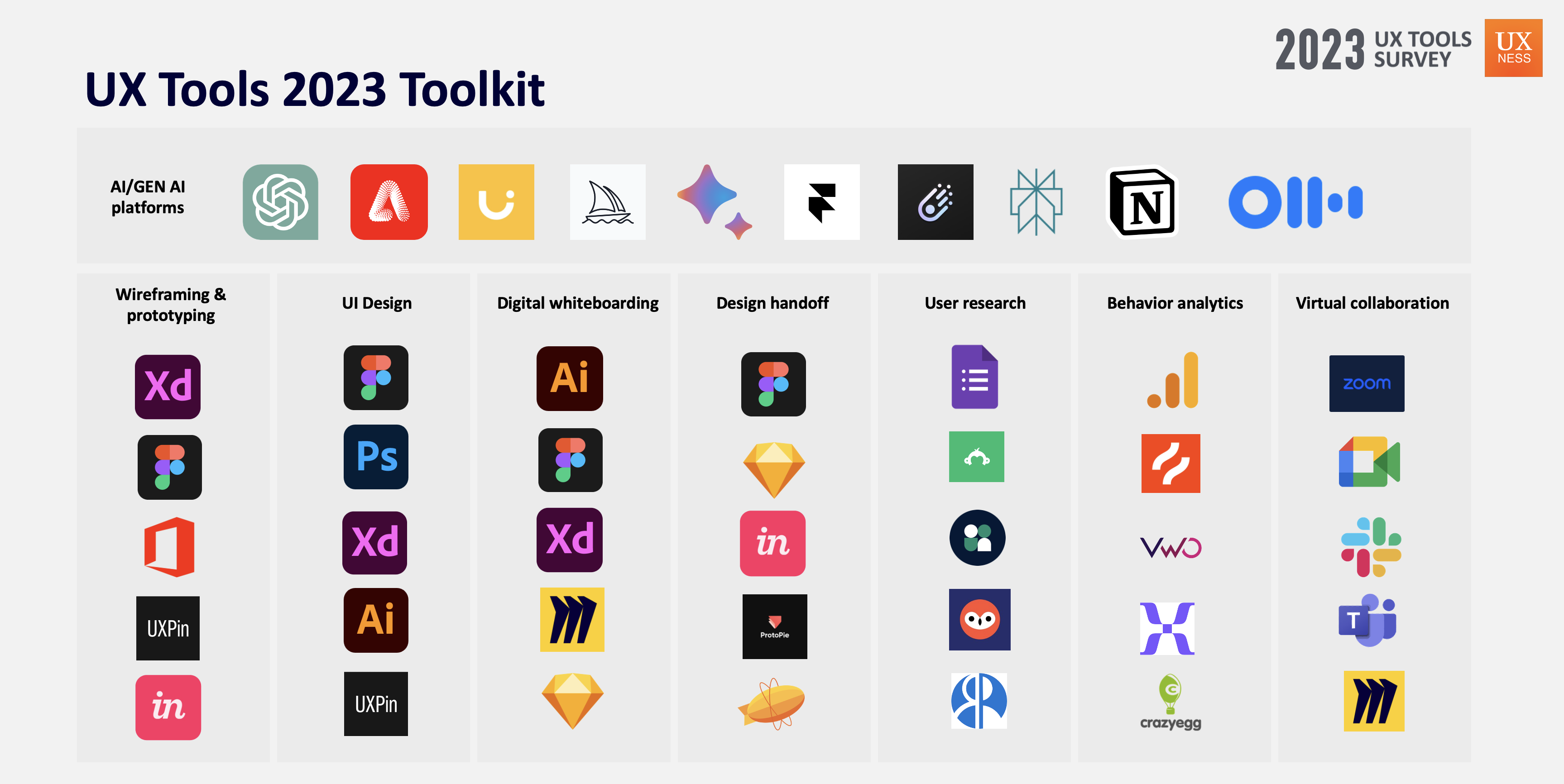
  • Top notable AI/Gen AI platforms being used by UX professionals: ChatGPT, Adobe Sensei, Uizard, Google Bard, Adobe Firefly.


Top choice AI/GenAI tools by UX Designers


Wireframing and Prototyping Tools
  

  • Adobe XD, Figma were the top choice Wireframing & Prototyping tools by the participants continuously for the third year. 
  • Top 5 Wireframing & Prototyping tools – Adobe XD (44%), Figma (43%), Microsoft Office (37%), UXPin (27%), Invision (14%). 
  • Notable entries this years – Proto.io, Framer, Miro, ProtoPie etc. 


3 Months free Interaction Design Foundation

UI Design Tools  

  • Adobe Photoshop, Figma were the top choice UI Design tools by the participants for this year. 
  • Top 5 UI Design tools – Figma (49%), Adobe Photoshop (43%), Adobe XD (33%), Adobe Illustrator (30%), UXPin (19%). Notable entries this years – Proto.io, Framer, Freehand MX etc.
Top 5 UI Design tools

Digital Whiteboarding Tools 
 

  • Adobe Illustrator, Figma were the top choice Digital Whiteboarding tools by the participants for this year. 
  • Top 5 Digital Whiteboarding tools – Adobe Illustrator (36%), FigJam (34%), Adobe XD (32%), Miro (24%), Sketch (19%). Notable entries this years – Overflow.io, Invision Freehand, Whimsical, Flowmapp etc.
Top 5 Digital whiteboarding tools


Design Handoff Tools  

  • Figma, Sketch were the top choice Design handoff tools by the participants consecutively for the 2nd year. 
  • Top 5 Design Handoff tools – Figma(47%), Sketch (25%), Invision (18%), ProtoPie (17%), Zeplin (15%). Notable entries – Abstract, Framer, Miro, Marvel etc.
Top 5 Design handoff tools

User Research Tools  

  • Google Forms, SurveyMonkey were the top choice User research tools by the participants. 
  • Top 5 User Research tools – Google Forms (54%), SurveyMonkey(35%), User Interviews (27%), UserZoom (27%), Respondent.io (22%). Notable entries – ProvenByUsers, Typeform, UXTweak, Maze etc.
Top 5 User research tools

3 Months free Interaction Design Foundation


Behaviour Analytics Tools  

  • Google analytics, HotJar were the top choice user behavior analytics tools by the participants consecutive for the 3rd year. 
  • Top 5 Behavior Analytics tools – Google Analytics (54%), Hotjar (21%), Visual Website Optimizer (18%), Mixpanel (13%), Crazyegg (8%).
Top 5 Behavior analytics tools


Virtual Collaboration Tools  

  • Google Meet, Zoom were the top choice Virtual Collaboration tools by the participants. 
  • Top 5 Virtual Collaboration tools – Google Meet (56%), Zoom(55%), Microsoft Teams (45%), Slack (31%), Skype (27%).

Top 5 Virtual collaboration tools

UX Tools Toolkit 2023 


Download UX Tools Survey 2023 full report

Thank you for exploring the UX Tools Survey report (2023). If you find value in the Annual UX Tools Insights 2023, support UXness on Buy Me a Coffee to help us continue bringing impactful UX research and insights! 

Buy Me A Coffee logo


Special gift for readers 

IxDF Free Membership UX Courses

As UXNESS being official Education Partner Interaction Design Foundation (IxDF), brings you 25% discounts (3 Months Free) subscription on UX courses.

Share:
Continue Reading →

Wednesday, 15 February 2023

Trending Wireframing & Prototyping Tools of 2023


Trending Wireframing & Prototyping Tools of 2023


Wireframing is a design method used in the early stages of creating a user interface (UI) for a product, such as a website, mobile app, or software application. It involves creating simple, low-fidelity representations of the layout, structure, and interactions of a product. These representations, called wireframes, are used to communicate the design intent and to test usability before committing to a final design.

The main goal of wireframing is to establish the structure and layout of the interface in a quick, simple, and efficient way, while also allowing for testing and iteration.


Based on our analysis of UX design tools survey 2022 results (2nd UX Tools Survey campaign) the top rated Wireframing & Prototyping Tools are there:


To see the full report  Check 2022 UX Tools survey report


Figma:  This is a browser-based tool that allows real-time collaboration and editing, and it is perfect for a design team to work on wireframes and prototypes together.

Key features:

  1. Collaboration: Figma allows for real-time collaboration, where multiple people can work on the same design file simultaneously, and it also allows for easy version control and commenting.
  2. Prototyping: Figma allows for easy prototyping, where you can create interactive wireframes and mockups, and also allows to test the design with stakeholders.
  3. Components: Figma allows you to create reusable components, such as buttons, forms, and navigation, which can be easily updated across multiple pages.


Explore Figma


3 Months free Interaction Design Foundation


Adobe XD: This tool is part of the Adobe Creative Suite and it's a vector-based design and wireframing tool that allows designers to create wireframes, interactive prototypes, and high-fidelity designs all in one program.

Key features:

  1. Design: Adobe XD allows you to design high-fidelity, polished interfaces using vector-based design tools, similar to Adobe Illustrator.
  2. Collaboration: Adobe XD allows you to share your designs with stakeholders, clients, and team members and get feedback in real-time.
  3. Built-in UI kits: Adobe XD comes with built-in UI kits for popular platforms such as iOS, Android, and Windows.

Explore Adobe XD


Sketch: This tool is a vector-based wireframing tool that's used primarily by web and app designers. It's designed to be used in conjunction with other tools in the Adobe Creative Suite, such as Photoshop and Illustrator.

Key features:

  1. Plugins: Sketch allows developers to create plugins to enhance the functionality of the tool.
  2. Platform independent: Sketch is a Mac-based tool, which means it can be accessed only from a Mac device.
  3. Sharing: Sketch allows you to share your designs with stakeholders, clients, and team members with a single click.

Explore Sketch


3 Months free Interaction Design Foundation


Axure: This tool is a more powerful wireframing tool, with advanced features such as built-in prototyping, collaboration, and documentation capabilities.

Key features:

  1. Interactive elements: Axure allows you to add interactive elements such as buttons, forms, and navigation, which can be used to create realistic and interactive prototypes.
  2. Platform independent: Axure is a desktop-based tool, which means it can be accessed from any device, and it doesn't require an internet connection.
  3. Plugins: Axure allows developers to create plugins to enhance the functionality of the tool.

Explore Axure


Balsamiq: This tool is known for its simple, sketch-like interface and easy-to-use drag-and-drop functionality. It's ideal for creating quick and rough wireframes.

Key features:

  1. Collaboration: Balsamiq allows you to share and collaborate on wireframes with stakeholders, clients, and team members in real-time.
  2. Built-in UI elements: Balsamiq has a library of built-in UI elements, such as buttons, forms, and navigation, that can be easily added to wireframes.
  3. Sketch-like interface: Balsamiq has a sketch-like interface that makes it easy to create quick and rough wireframes.

Explore Balasmiq


To see the full report  Check 2022 UX Tools survey report


3 Months free Interaction Design Foundation


Share:
Continue Reading →

Saturday, 17 December 2022

2022 - UX Tools Survey Results


2022 UX Tools survey

2022 UX Tools Survey


2022 — UX Tools Survey by UXness 

After successfully completing the "UX Tools survey campaign - 2021", UXNess brings the annual UX design tools survey 2022 results(2nd UX Tools Survey campaign). 

This survey is aimed to learn about UX & design tools and preferences by UX professionals, students etc. This is 2nd consecutive year of UX Tools survey campaign run by UXNESS Edulabs to understand the preference of using UX tools.


Download UX Tools Survey 2022 full report


Thanks to this years Sponsors & Partners

MUIQ powered by MeasuringU
Axure


Share:
Continue Reading →

Wednesday, 5 January 2022

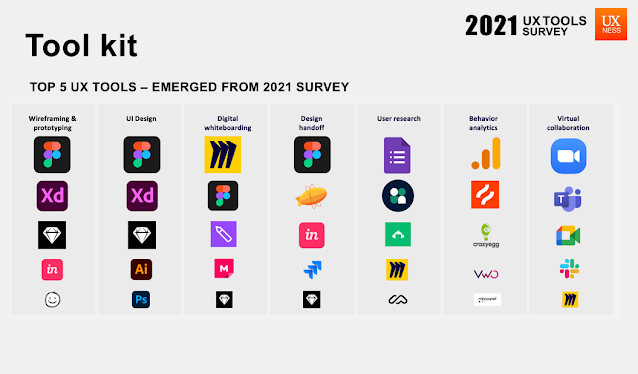
2021 - UX Tools Survey by UXness - Results


2021 - UX Tools Survey - Results


This study is targeted to learn about UX & design tools getting used by UX professionals, students, etc. It is an annual survey getting conducted by UXness Edulabs to understand the preference of using UX tools and bring insights. Please note, in this survey, we didn't ask for any personal details such as name, gender, contact details, employer name, location and email ID etc. 

Download full report

Thanks to sponsors & Partners 


SURVEY RESULTS & INSIGHTS


Participants demographic 

Participants demographic


In this campaign we have received the 400+ responses from across the globe. 38% participants were having role of 'UX Designers' and around 45% participants were having 5 years & more experience. 


Wireframing & Prototyping 

Figma, Adobe XD were the top choice wireframing & prototyping tools by the participants. 17% participants chose only Figma as ‘Wireframing & prototyping’ tool, whereas 9% selected Figma & Adobe XD together. 23% participants who use Figma were above 5 years of experience.

Wireframing & Prototyping


UI Design

Figma, Adobe XD were the top choice UI design tools by the participants. 23% participants chose only Figma as ‘UI Design’ tool. 12% participants selected Figma and Adobe XD together as UI design tool.

UI Design

Digital whiteboarding 

Miro was ahead in this category of Digital whiteboarding with 51% participants choice. 24% participants who chose Miro were from company size 10000+ employees. 25% Miro users were from 5 to 8 years of experience. 29% participants who chose Figma were from company size below 100 employees.

Digital whiteboarding

Design handoff

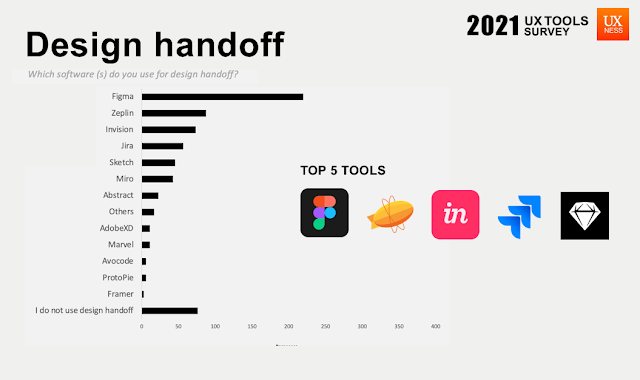
Figma, Zeplin were the top choice Design handoff tools by the participants. 45% participants who selected ‘I do not use design handoff tools’ were from company size below 100 employees. 41% participants who use design handoff tools were above 5 years of experience.

Design handoff

User research 

Google forms and User Interviews were the top choice User research tools by the participants. 26% participants who chose User Interviews were above 10 years of experience. Surprisingly Miro tool became the choice of 23% participants in user research.

User research


User behaviour analytics 

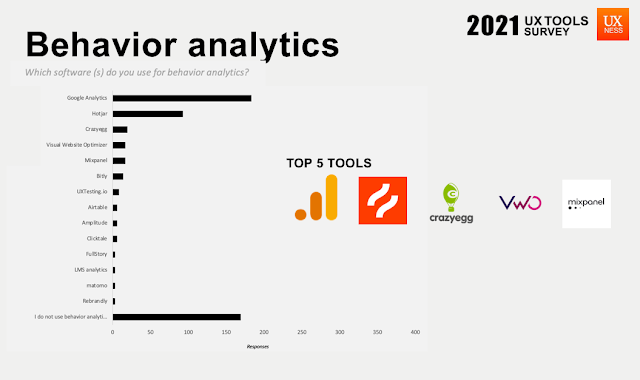
Google analytics and HotJar were the top choice user behavior analytics tools by the participants. Although, 38% participants do not use any behavior analytics tool. 58% participants who use behavior analytics tools were above 5 years of experience.

User behaviour analytics


Virtual collaboration 

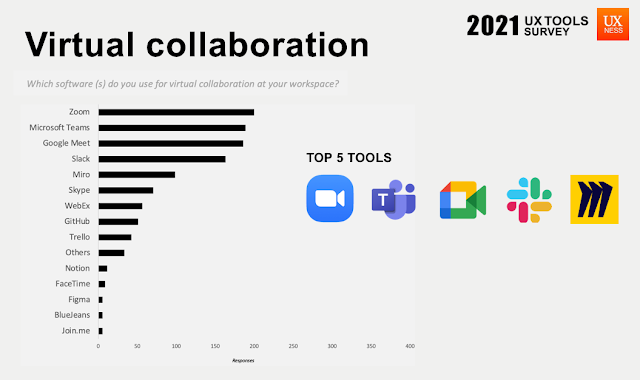
Zoom, Microsoft teams and Google Meet were the top choice virtual collaboration tools by the participants with marginal difference. Miro seems to be the trending tool for virtual collaboration.
Virtual collaboration

Conclusion

UX folks use multiple tools for performing certain activities. 
In this study, Figma seems to be the most versatile tool which gets used for various activities such as wireframing, prototyping, digital whiteboarding and design handoff. 
We also found Miro not only getting used as a Digital whiteboarding and virtual collaboration platform but also getting used in User research. 


UX Tools Tool kit 2021


Thank you for exploring the UX Tools Survey report (2021). Please share your feedback, comments, suggestions, questions with us at team@uxness.in 


Download full report


Thank you for exploring the UX Tools Survey report (2021). If you find value in the Annual UX Tools Insights 2021, support UXness on Buy Me a Coffee to help us continue bringing impactful UX research and insights! 

Buy Me A Coffee logo


Previous UX tools Survey


Sponsors & Partners 


Maze - Gold sponsor UX tools surveyUXTesting - Silver sponsor UX tools survey

Share:
Continue Reading →

Tuesday, 6 April 2021

Top Alternatives of Figma - prototyping tools

Top Alternatives of Figma


InVision

Invision tool

The digital product design platform used to make the world's best customer experiences
URL: https://www.invisionapp.com/


3 Months free Interaction Design Foundation


Sketch 


Sketch tool

Sketch is a vector graphics editor for macOS developed by the Dutch company Sketch B.V. (formerly named Bohemian Coding). It was first released on 7 September 2010 and won an Apple Design Award in 2012.
URL: https://www.sketch.com/ 

Moqups


Moqups tool

Moqups is a visual collaboration tool that combines whiteboard, diagram, and design features in a single, online app.
URL: https://moqups.com/


DISCLOSURE: This post may contain affiliate links, meaning when you click the links and make a purchase, we receive a commission.

UX Design certificate by Google


Axure RP

Axure RP Tool

Axure RP is the only prototyping software that lets you quickly make rich, functional prototypes so you can make informed choices even on your most urgent projects.
URL: https://www.axure.com/

Lucidchart 


Lucidchart tool
Create flowcharts & diagrams online with Lucidchart. No download needed. Get the most powerful, professional diagram software on the market. Collaborative. Over 10,000,000+ Users. Seamless Integrations. For PC, Mac, and Linux. Intuitive. Secure & Reliable.
URL : https://www.lucidchart.com/


Balsamiq 


Balsamiq tool
With Balsamiq, anyone can design great websites. Try it for Free! Collaborate Smoothly. Rapid wireframing. One time purchase. Free Trial - Download Now. Mockups for MacOSX. Licenses tied to humans. Work Faster & Smarter.
URL: https://balsamiq.com/


Top UX Courses at Udemy


Adobe XD

Adobe XD tool

The all-in-one UX solution for designing websites, mobile apps, & more. Free! Developer handoff. Fast, versatile artboards. Smart canvas navigation. Mac and Windows.


UXPin 

UXPin tool


UXPin is not your average prototyping tool for linking static screens or artboards with transitions.
URL: https://www.uxpin.com/ 


Explore more UX Tools>> 


3 Months free Interaction Design Foundation

Share:
Continue Reading →