Showing posts with label survey. Show all posts

Sunday, 24 December 2023

UX Tools Survey 2023 - Results


UX tools Survey 2023 Results

UX Tools Survey 2023 Results 

This survey is designed to gather insights into the preferences and utilization of UX and design tools among professionals and students in the field of User Experience (UX). Organised by UXNESS Edulabs, this marks the third consecutive year of the UX Tools survey campaign, aimed at comprehending the prevailing preferences and trends in the application of UX tools. This years UX Tools Survey is special since we added 'AI/Gen AI' Tools as a new category. 


Download UX Tools Survey 2023 full report


Participants demographics 


This year we recorded a great mix of participants demographics with respect to role, years of experience and employer size. Top participants roles UX & product Designers 32% combined, UI Designers 15%, UX Researchers 10% etc. Overall 30% participants were above 5 years of experience and 41% participants between 2 to 8 years of experience. 17% participants were from employer size 5000+.


AI/Gen AI Tools 

  • 58% participants (UX Professionals and students) feel ‘Strongly Agree’ and 'Agree' "AI/Gen AI has great potential in shaping the UX tools and their usage." [Average = 5.66, Mode = 7 (Strongly Agree)' 
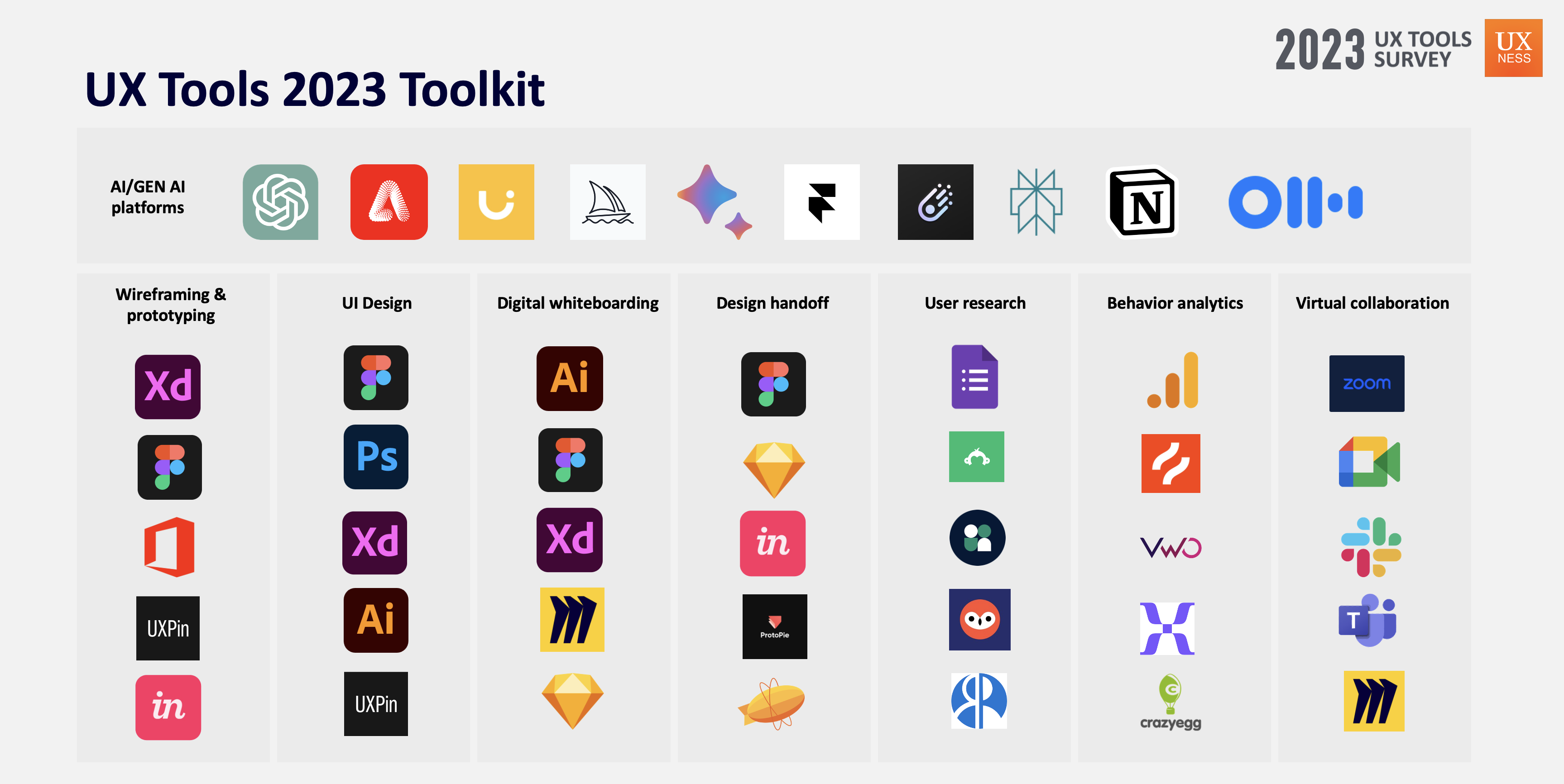
  • Top notable AI/Gen AI platforms being used by UX professionals: ChatGPT, Adobe Sensei, Uizard, Google Bard, Adobe Firefly.


Top choice AI/GenAI tools by UX Designers


Wireframing and Prototyping Tools
  

  • Adobe XD, Figma were the top choice Wireframing & Prototyping tools by the participants continuously for the third year. 
  • Top 5 Wireframing & Prototyping tools – Adobe XD (44%), Figma (43%), Microsoft Office (37%), UXPin (27%), Invision (14%). 
  • Notable entries this years – Proto.io, Framer, Miro, ProtoPie etc. 


3 Months free Interaction Design Foundation

UI Design Tools  

  • Adobe Photoshop, Figma were the top choice UI Design tools by the participants for this year. 
  • Top 5 UI Design tools – Figma (49%), Adobe Photoshop (43%), Adobe XD (33%), Adobe Illustrator (30%), UXPin (19%). Notable entries this years – Proto.io, Framer, Freehand MX etc.
Top 5 UI Design tools

Digital Whiteboarding Tools 
 

  • Adobe Illustrator, Figma were the top choice Digital Whiteboarding tools by the participants for this year. 
  • Top 5 Digital Whiteboarding tools – Adobe Illustrator (36%), FigJam (34%), Adobe XD (32%), Miro (24%), Sketch (19%). Notable entries this years – Overflow.io, Invision Freehand, Whimsical, Flowmapp etc.
Top 5 Digital whiteboarding tools


Design Handoff Tools  

  • Figma, Sketch were the top choice Design handoff tools by the participants consecutively for the 2nd year. 
  • Top 5 Design Handoff tools – Figma(47%), Sketch (25%), Invision (18%), ProtoPie (17%), Zeplin (15%). Notable entries – Abstract, Framer, Miro, Marvel etc.
Top 5 Design handoff tools

User Research Tools  

  • Google Forms, SurveyMonkey were the top choice User research tools by the participants. 
  • Top 5 User Research tools – Google Forms (54%), SurveyMonkey(35%), User Interviews (27%), UserZoom (27%), Respondent.io (22%). Notable entries – ProvenByUsers, Typeform, UXTweak, Maze etc.
Top 5 User research tools

3 Months free Interaction Design Foundation


Behaviour Analytics Tools  

  • Google analytics, HotJar were the top choice user behavior analytics tools by the participants consecutive for the 3rd year. 
  • Top 5 Behavior Analytics tools – Google Analytics (54%), Hotjar (21%), Visual Website Optimizer (18%), Mixpanel (13%), Crazyegg (8%).
Top 5 Behavior analytics tools


Virtual Collaboration Tools  

  • Google Meet, Zoom were the top choice Virtual Collaboration tools by the participants. 
  • Top 5 Virtual Collaboration tools – Google Meet (56%), Zoom(55%), Microsoft Teams (45%), Slack (31%), Skype (27%).

Top 5 Virtual collaboration tools

UX Tools Toolkit 2023 


Download UX Tools Survey 2023 full report

Thank you for exploring the UX Tools Survey report (2023). If you find value in the Annual UX Tools Insights 2023, support UXness on Buy Me a Coffee to help us continue bringing impactful UX research and insights! 

Buy Me A Coffee logo


Special gift for readers 

IxDF Free Membership UX Courses

As UXNESS being official Education Partner Interaction Design Foundation (IxDF), brings you 25% discounts (3 Months Free) subscription on UX courses.

Share:
Continue Reading →

Tuesday, 4 July 2023

Hand picked Survey tools for UX designers


Best Survey tool for UX design


Surveys are an important user research method, in which user information at bigger counts gets considered. Surveys can be used for quantitative data gathering method which can be conducted to understand user information, usage pattern, and preferences etc. for any new or launched application. Also in marketing industry surveys are an important tool for understanding market status. There are some tools available which makes this complete process easy & flexible. They include survey creating, conducting survey on internet, sharing survey to users on internet, real time analysis of survey 
Responses and report generation of survey response etc. Providing a curated list for some top survey tools.

Share:
Continue Reading →

Saturday, 17 December 2022

2022 - UX Tools Survey Results


2022 UX Tools survey

2022 UX Tools Survey


2022 — UX Tools Survey by UXness 

After successfully completing the "UX Tools survey campaign - 2021", UXNess brings the annual UX design tools survey 2022 results(2nd UX Tools Survey campaign). 

This survey is aimed to learn about UX & design tools and preferences by UX professionals, students etc. This is 2nd consecutive year of UX Tools survey campaign run by UXNESS Edulabs to understand the preference of using UX tools.


Download UX Tools Survey 2022 full report


Thanks to this years Sponsors & Partners

MUIQ powered by MeasuringU
Axure


Share:
Continue Reading →

Wednesday, 5 January 2022

2021 - UX Tools Survey by UXness - Results


2021 - UX Tools Survey - Results


This study is targeted to learn about UX & design tools getting used by UX professionals, students, etc. It is an annual survey getting conducted by UXness Edulabs to understand the preference of using UX tools and bring insights. Please note, in this survey, we didn't ask for any personal details such as name, gender, contact details, employer name, location and email ID etc. 

Download full report

Thanks to sponsors & Partners 


SURVEY RESULTS & INSIGHTS


Participants demographic 

Participants demographic


In this campaign we have received the 400+ responses from across the globe. 38% participants were having role of 'UX Designers' and around 45% participants were having 5 years & more experience. 


Wireframing & Prototyping 

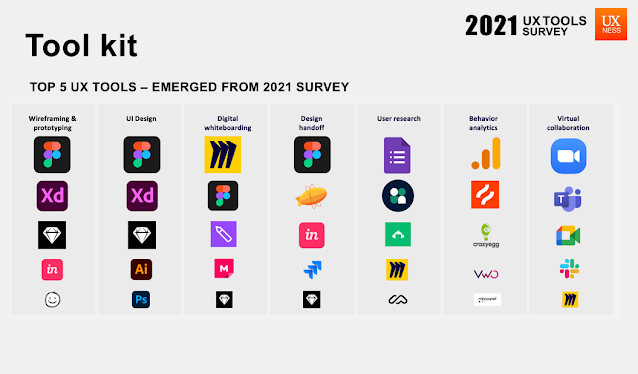
Figma, Adobe XD were the top choice wireframing & prototyping tools by the participants. 17% participants chose only Figma as ‘Wireframing & prototyping’ tool, whereas 9% selected Figma & Adobe XD together. 23% participants who use Figma were above 5 years of experience.

Wireframing & Prototyping


UI Design

Figma, Adobe XD were the top choice UI design tools by the participants. 23% participants chose only Figma as ‘UI Design’ tool. 12% participants selected Figma and Adobe XD together as UI design tool.

UI Design

Digital whiteboarding 

Miro was ahead in this category of Digital whiteboarding with 51% participants choice. 24% participants who chose Miro were from company size 10000+ employees. 25% Miro users were from 5 to 8 years of experience. 29% participants who chose Figma were from company size below 100 employees.

Digital whiteboarding

Design handoff

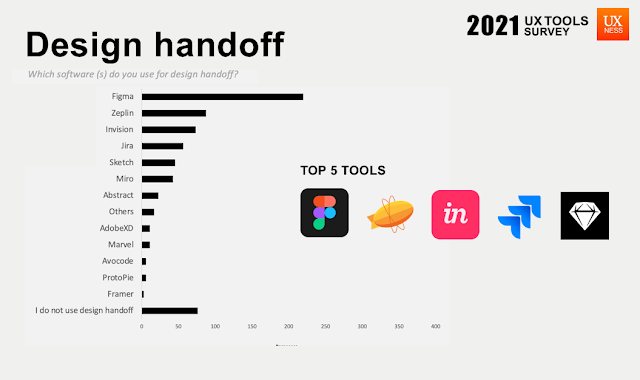
Figma, Zeplin were the top choice Design handoff tools by the participants. 45% participants who selected ‘I do not use design handoff tools’ were from company size below 100 employees. 41% participants who use design handoff tools were above 5 years of experience.

Design handoff

User research 

Google forms and User Interviews were the top choice User research tools by the participants. 26% participants who chose User Interviews were above 10 years of experience. Surprisingly Miro tool became the choice of 23% participants in user research.

User research


User behaviour analytics 

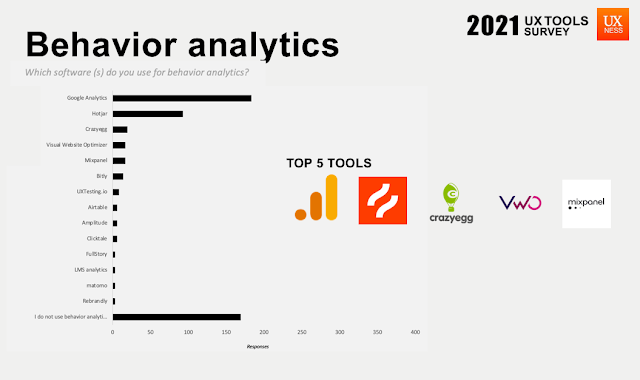
Google analytics and HotJar were the top choice user behavior analytics tools by the participants. Although, 38% participants do not use any behavior analytics tool. 58% participants who use behavior analytics tools were above 5 years of experience.

User behaviour analytics


Virtual collaboration 

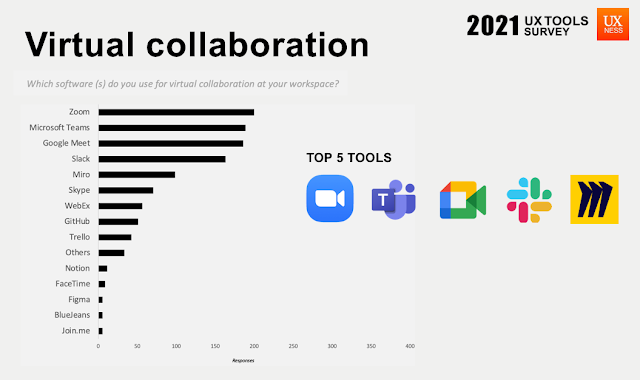
Zoom, Microsoft teams and Google Meet were the top choice virtual collaboration tools by the participants with marginal difference. Miro seems to be the trending tool for virtual collaboration.
Virtual collaboration

Conclusion

UX folks use multiple tools for performing certain activities. 
In this study, Figma seems to be the most versatile tool which gets used for various activities such as wireframing, prototyping, digital whiteboarding and design handoff. 
We also found Miro not only getting used as a Digital whiteboarding and virtual collaboration platform but also getting used in User research. 


UX Tools Tool kit 2021


Thank you for exploring the UX Tools Survey report (2021). Please share your feedback, comments, suggestions, questions with us at team@uxness.in 


Download full report


Thank you for exploring the UX Tools Survey report (2021). If you find value in the Annual UX Tools Insights 2021, support UXness on Buy Me a Coffee to help us continue bringing impactful UX research and insights! 

Buy Me A Coffee logo


Previous UX tools Survey


Sponsors & Partners 


Maze - Gold sponsor UX tools surveyUXTesting - Silver sponsor UX tools survey

Share:
Continue Reading →

Monday, 3 May 2021

Survey research - Ways to clean survey data before analysis


Survey research data cleaning

A survey is a research method used for collecting data from a predefined group of respondents to gain information and insights into various topics of interest. The process involves asking people for information through a questionnaire, which can be either online or offline. According to Interaction Design Foundation “Surveys and Questionnaires – When you ask for many users’ opinions, you will gain massive amounts of information. Keep in mind that you’ll have data about what users say they do, as opposed to insights into what they do. You can get more reliable results if you incentivize your participants well and use the right format.”


Surveys are an important user research method, in which userinformation at bigger counts gets considered. Before stating with data analysis it is important to validate the data quality, else it may deteriorate the inferences and can lead to wrong insights. The data quality can be improved by doing detail data cleaning. 


DISCLOSURE: This post may contain affiliate links, meaning when you click the links and make a purchase, we receive a commission.

UX Design certificate by Google


Survey data cleaning involves identifying and removing responses from individuals who either don’t match your target audience criteria or didn’t answer your questions thoughtfully. There are several ways your survey data can have false data points which needs to be removed before beginning the analysis. Below are some of the ways you can clear false data from gathered survey data and improve the quality of your data. 


How to conduct data cleaning in survey


Remove partially completed responses - 

You might have noticed that sometimes few participants did not answer all the survey questions due to any reason (ex. Technical issue, fatigue, non-interest etc.) This partial filled data can create some noise in pure data analysis. It is advised to remove the partial completed responses from the overall data before starting analysis.   


Remove straightliners - 

Researchers needs to be cautious about straightline respondents and responses must be removed before analysis. Straightlining is when respondents choose similar answer option frequently (such as first/last option etc.). There might be higher possibility that the respondent has not responded the answers honestly. 

3 Months free Interaction Design Foundation


Remove Speed responses - 

Imagine the average time to complete your survey is 4:30 minutes and you have found the quickest response by one of the participant was 20 seconds. There is higher chances that quickest respondent might have completed survey just to complete. This kind of responses are called speed responses. There is no certain rule to identify such speed responses but some statistics calculation can help you such as: take average completion of time, check min and max range of time, set your own rule of remove responses which are x% less than the average. 

Remove outliers - 

Sometimes you have encountered responses falling under unrealistic range for example “In which sport you see yourself as pro” and one respondent selected all the sports from option. This kind of responses are called outliers. Outliers can not be said as fake response but also should be removed before starting analysis because it may impact some calculation ex. Range, min-max values, st. deviation, average etc. 

UX Design certificate by Google

Remove fake or manipulated answers - 

This becomes tricky sometimes but researchers should always be beware of fake or manipulated responses from participants. There are many ways to check fake responses such as, using open ended questions - check is any response contain unreadable or meaningless response like ‘fgfgfh’ type text etc. Another way is to check fake response by having multiple questions to validate response like one question “Do you play outdoor games? (With responses I don’t like playing outdoor game)”, after few questions another question can be added in survey like “which outdoor question do you like the most”. If some participants responding “I don’t like playing outdoor games” and later the same participants responding like they like football. These participants might have a high probability in faking the responses and can be eliminated from master data. 


Read more:

https://www.interaction-design.org/literature/article/useful-survey-questions-for-user-feedback-surveys?ep=uxness

https://www.uxness.in/2016/06/10-survey-tools-for-ux-designers.html 


3 Months free Interaction Design Foundation


Share:
Continue Reading →

Tuesday, 23 August 2016

8 Essential Design Tools For UX Newbies to Make Work Easier

As a UX designer, we will need to get familiar with the essentials of user experience, from user research to wireframing to collaboration to designing a final product. In this post I’m going to cover the UX design tools you’ll need for every aspect of your work as a UX designer, from beginning to end. Hopefully, it will simplify the way you work and make your lifer easier.

User Research

User Research focuses on understanding user behaviors, needs, and motivations through observation techniques, task analysis, and other feedback methodologies.
Surveys and questionnaires are great ways to gather information. 
Survey Tool: SurveyMonkey


SurveyMonkey is one of the best provider of survey software. There is a free version available with limitations, but the free version is still a very handy tool and allows up to 10 questions per survey. SurveyMonkey is pretty straightforward and fairly easy to use. It allows you to select from many pre-written questions. For basic surveys, I think SurveyMonkey is a great choice.

Usability Testing

Usability testing is a technique used in user-centered interaction design to evaluate a product by testing it on users. Usability testing is the best way to understand how real users experience your website or application.
 Usability Testing Tool: UserTesting


UserTesting is an online usability testing tool that allows to get videos of real people speaking their thoughts as they use websites, mobile apps and prototypes. The service works for landing pages, emails, ad, prototypes, live sites, and apps. You can opt to have your test designed by an experienced in-house research team, or have a project manager come on to oversee that you accomplish your goals.

Prototype Design

Wireframing tools make creating a website or application fundamentally easier. UX designers use wireframes and prototypes to create the products logic. It simplifies the communication between UX designers and clients and saves us much time on product development.
Rapid Prototyping Tool: Mockplus


Mockplus is an excellent tool to prototype app and website. It can be used to prototype for mobile, desktop and web apps quickly. Building an interactive prototype with Mockplus is much easier compared to an old prototyping tool like Axure or Justinmind. The intuitive drag-and-drop UI makes it possible to start using the tool immediately. Even the first-time users can master it without having to go over tutorials and training manuals. If you are looking for a UX tool that is cheap and allows to create interactive prototypes in a minimum of time, I recommend using Mockplus.

Collaboration

Communication is one of the critical skills of the UX designers. Want to improve communication with your team? Or work remotely but still stay in touch? That’s where collaboration tools come in.
Collaboration Tool: Red Pen


Red pen is a lightweight tool which lets you upload a file and share it with clients and team members for feedback. You can ask colleagues and clients for feedback by giving them a private link, or inviting them via email. It very easy for designers to get feedback and approve artwork in a professional manner.

Design Style Guides

Most projects can benefit from having a style guide. Using a design style guide ensures consistency throughout a project. Some style guides focus on specific topic areas such as graphic design, including typography. Website style guides cover a publication’s visual and technical aspects along with text.
Tool: Frontify


Frontify is a web design tool that helps designers create branding and style guides for their projects. The user can provide better documentation without wasting a lot of time on the process. An in-browser color picker is included along with an automatic color name proposal. What makes Frontify standout is that it is a place for itself by combining web design and development tools as well as a tidy, streamlined interface. Users can communicate quickly and gather valuable input easily.

Other Design Resource

Free Icons: iconfinder


Iconfinder is basically an icon search engine that anyone can use for free. According to Iconfinder, it now hosts the worlds largest collection of premium icons. It provides millions of beautiful icons to web designers and developers. All the icons are available to download for free in SVG, PNG, AI, or CSH. It is also an online marketplace for buying and selling premium icons.

Screen Specifications: Screen Sizes


Screensiz is very helpful to quickly find the screen specifications of the most popular devices and monitors currently on the market.

Color Picker: Adobe Color Wheel


Color selection can be one of the hardest parts of UX design, especially when you’ve just started. Adobe Color Wheel is an easy to use design tool. Upload a picture, you’re then given an accurate color palate. You can not only upload to the cloud, but can also pull your own themes, or themes created by others. This means that if you’re not feeling particularly inspired, you can have a look at themes that others have uploaded, pull one to your device, and adjust it to your tastes.

Conclusion

The primary purpose of using tools is to help us work more efficiently, so the faster you can master it the better. I hope these design tools will be helpful to you. Furthermore, there are plenty of other UX tools available, which may also be of interest. Feel free to leave any comments below.

About Author

Becky
Email: becky@jongde.com

Share:
Continue Reading →