Showing posts with label startups. Show all posts

Thursday, 30 January 2025

Top 6 platform to hire freelance UI/UX designers (2026)


Hire freelance UIUX designer


Photo by Jonas Leupe on Unsplash

Updated on 13 Dec 2025

Many a times finding an efficient UX resource becomes a critical issue for business, startups, individuals. There are many situations where for any company, business or employer find it difficult to hire resources on permanent basis. One solution to such problems is to go on freelancing world and find best resources. 
Finding the right UI/UX designer is crucial for creating intuitive and engaging digital experiences. Whether you're a startup, an established business, or an entrepreneur, hiring skilled freelance UI/UX designers can provide flexibility and specialized expertise without the overhead of a full-time hire. Here are six top platforms where you can find talented UI/UX designers to meet your project needs.


1. Upwork

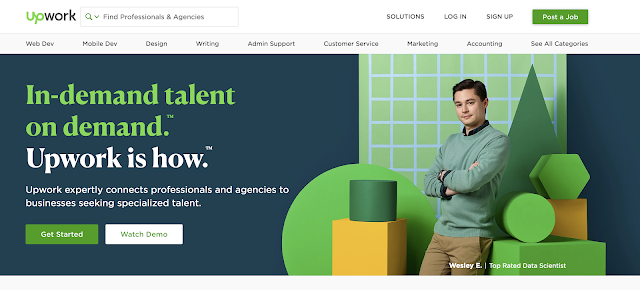
Upwork freelancer
Upwork connects businesses of all sizes to freelancers, independent professionals, and agencies for all their hiring needs. 
Upwork is one of the most popular freelance platforms, offering access to a vast pool of UI/UX designers. You can browse freelancer profiles, review portfolios, and post job listings with specific requirements. The platform allows you to hire based on hourly rates or fixed-price contracts, making it a flexible option for different budget ranges.

Key Features:
  • Large talent pool with verified reviews
  • Secure payment system
  • Options for both hourly and fixed-price contracts


Share:
Continue Reading →

Tuesday, 15 June 2021

Benefits of UX Research & Why Startups Are Afraid to Invest In It

Design team working

Introduction

Have you ever wondered why some products like Airbnb, Netflix, Uber, and the likes, became the giants that they are? What is the secret piece that worked for them that somehow many others lack? That missing piece is no magic. It took vision and a true sense of judgment along with research for implementing that which is non-negotiable.

The idea of a user-centered product is a focal point across a variety of industries today. Companies are seeing benefits in placing their users at the start of their design decisions. In an industry devoted to the people who use our products, services, and applications, research is paramount.


Mobile app design

*Designed by stories


Start-ups especially have always been tight-strapped for money, and more often than not they shy away from investing in user research with the impression that it’ll cost the big bucks. But, if truth be told, user research can save a lot of time, money, and effort and bring the brand closer to success sooner. If there was one principle that startups today should swear by, it would be “People ignore design that ignores people”

In this article, we’ll observe the many factors that contribute to User research, why companies don’t indulge in it, why they should and how it can help them a great deal.


3 Months free Interaction Design Foundation


What is UX Research?

In simple terms, UX Research is studying and evaluating the target audience. Understanding their behavioral patterns, experience, interaction, and emotion towards your product and the mindset they come with when using the product.


designer working remotely


According to a recent study, India sees about 50,000 new start-ups every year. An average of 2-3 start-ups is born every day, and yet India sees only a 10% success rate. While one may or may not be aware of problems that lead to that, one thing start-ups can assess is the Users' experience. [1] If the user successfully uses the product, which enhances the users' life, naturally, there will be a rise in the demand for such products, hence making it highly unlikely that the product or brand will fail.

So, if that's the case, why do start-ups shy away from UX research? 

Or, what are the myths of UX Research that fog the minds of new entrepreneurs today? And how it causes more harm than good.


1. UX Research is exorbitant

The common mindset is that Research is expensive and time-consuming. Whereas, research and user study is an effective way of reducing costs.


2. I know my users very well

The exercise of creating personas and scenarios sometimes isn't enough because no matter how much we feel we know our users, several factors affect the users daily that change them. The way they interact with a product evolves along with their growth. One cannot completely know their users without testing how they react to the product in front of them with their various emotions and other factors both internal and external.


3. Time-consuming

Most people have a notion that research is a time-consuming exercise. But, if a product is tested before it goes public, the time and money you spend are far less than if you do it in the future. Users get a much more refined product to interact with and that saves time, money & reputation. 

Realizing this mindset and attempting to bring change can greatly help the brand. We ask questions, take notes and learn everything we can about our audience. Post this, we need to iteratively test our work throughout the design process.


DISCLOSURE: This post may contain affiliate links, meaning when you click the links and make a purchase, we receive a commission.

Top UX Courses at Udemy


Here are a few areas where UX Research saves the show:


1. Deep understanding of our users


Bad ux

*Designed by stories


Whatever we create or build, it sells when the users use it effectively, and it can only come from an in-depth understanding of their behaviors, habits, needs, pains, etc. And for this, we need to engage in qualitative research. Not investing in this exercise can lead to misunderstanding your user group and in turn providing a product that doesn’t resonate with your real audience.


2. Validate your assumptions and analysis


shopping experience digital

*Designed by stories


After the desk research phase, we arrive at different personas and scenarios that help us humanize our imagination. UX research comes in further after this stage where even the personas are validated by seeing real people in action. When you see your users using your product in real circumstances given all possible situations there could be, you can view the impact of your product.


3. Seeing our users in action


UX audits

*Designed by stories


Once we have the product, having the users use it and interact with it helps us learn how they are reacting to it. It is a meeting point of what we know vs what is happening. This allows us to make necessary amends early on that can help save cost and time. Skipping this part of the process can lead to many reworks and also endangers the credibility of the product as well as the brand.


4. Cost-saving


Success good ux

*Designed by stories


Knowing what comes next makes us either take precautionary steps or be prepared for it. The same happens when UX research is exercised. Seeing users in action, testing products, and validating personas makes us save up on all avoidable costs that we can't predict.

UX Research doesn't always have to cost an arm and a leg. It can be budgeted when well planned with clear goals. 


3 Months free Interaction Design Foundation


Top 5 inexpensive but effective ways to conduct UX Research:


1. Desk Research

The most inexpensive way to conduct research is Desk Research. With tons of articles and data available on the internet today, the world is at your fingertips.

Not only will you have your understanding of data, but you will also find research and data conducted by similar players in the market. 


2. Usability Testing

As the name suggests, usability testing is self-explanatory. Having users test your product and observing how they interact with and react to it, is a way to analyze whether your product is creating the result you imagined it will. This exercise makes you see your product from the eyes of the user. 


3. Guerilla Testing

Sometimes hiring a lab designated for research can turn out to be pricey. Instead, going to cafes or parks and having your product tested by strangers or even family, can result in efficient results too. You can also test prototypes and assess the interaction of the users before the final product.


4. Questionnaires

Another great, inexpensive way to gather information and understand the needs and wants of people. Creating questionnaires, even detailed and sending them out to hundreds and thousands of people if possible can prove to be an effective form of research. This particular method branches under quantitative research methods.


5. A/B Testing

Giving users 2 options when you’re not sure which one will work best for them helps decide as you see them interact with both. Created for the users, tested by the users, and chosen by the users is not heavy on the pocket option for conducting UX research.


Conclusion

All in all, it is safe to say that UX research makes us understand our users better and thus this is one of the most necessary steps that cannot be discounted. It provides insights to be implemented into the design & experience making the design meaningful & engaging. Also, it can save money and time well in advance to create successful products for our users. 


About Author


Harshi Shah UX Author
Harshi Shah

Associate UX Designer at Lollypop Design Studio

Vocalist/ Fitness Enthusiast/ Problem Solver


You’ll find me either humming a song, planning something in my diary or enjoying my masala chai. Coming from a graphic design background and having an entrepreneurial history, the path of experience design that I am on now, feels almost like second nature to me. I look forward to good conversations about design, travel, workouts and people in general.


3 Months free Interaction Design Foundation


Share:
Continue Reading →

Saturday, 6 June 2020

Why will a tech start-up should get their product designs done from a UX agency?

UX UI Design
Image Source – www.krishaweb.com

The web and mobile development bandwagon are scaling newer heights with more customers shifting base to the online domain. Even retail outlets have gone online with the distinct promotional strategy of attracting more clients. In the scope of such brimming opportunities and a multitude of possibilities, clients are coming across choosy and informed on creating interactive design aspects. In this scenario, the development companies who bank on their development skills feel the restraint of design-oriented professionals.

Development companies have realised the importance of the design aspect and the specialisation it calls for. The UX team is not only about the look, feel and usability of design but, extends well beyond its scope to undertake research, understand customer engagements, analysing user experiences and building prototypes that are conveying.

While developers are more of the technical coding league, designers come to enhance aesthetics. Like an architect builds and an interior designer decorates. The tech team might come with strong coding expertise, they will, however, be superficial in the user design aspect. The tech team or the developers are inclined towards the latest technological updates, building backend, support technology and, cloud storage etc. The UX designers come to fill the need for a comprehensive design that is aesthetically compelling and technically sound.


Tech start-ups who are creating their platforms are looking for creating unforgettable experiences. User design, text, sound, interfaces and usability are

the key elements UX designers came to create. However, these elements are not superficially created to adjust to the different client requirements, but research- oriented strategic planning goes before defining the scope of the project. www.forbes.com states that the number one reason start-ups fail is that they fail to understand, "No Market Need.”

While start-ups are all geared up to create experiences that will create a stream of clients, UX designers play an important role in this journey. UX designer has evolved as a profession as well the role quintessentially generates ROI that is the need of every organisation. But primarily, UX designers understand the need of the consumers and build it in their products for a satisfactory experience. User experience is a term common to both the consumer and the client. While the consumer banks on great user experiences for a memorable experience, the client at the same time wants to create such user experience to have the consumer come back, we can refer this as customer experience (CX). In this, the common link is the UX Designer / Agency who creates the user experiences.

While User Experience is such an important element of the product life cycle, it is imperative that the process is supported by the right finances and timelines. While the technical team might understand the need for good design, the other stakeholders - the owners or investors might not totally understand the need for good UX expertise. The stakeholders involved in the process need to be convinced on the positive and efficient outcomes User Experience can generate. The stakeholders need to be on the same page as the UX team before initiating the process.

Pineapple Studios states, 'According to Analysis 101 start-up post-mortems, ignoring the users, their needs and not accounting for great user experience is the reason why 17% of the start-ups fail. 17% is a huge number and can't be ignored. While other studies show the effect of UX/UI of a product in a company amounts to 30% of its success. This overpowers the contribution of a good business model towards the company's success.

UX designers begin a process with thorough customer-oriented research before even delving into the design aspect of the project. A UX designer is a multi- faceted role which is sometimes defined by one person or mostly by a set of professionals including –


UX Process and Methodology


Research

The UX researcher conducts concise and consumer-oriented research for the deep-rooted problems consumers are facing with the current similar products in the market. Research is carried around the parameters that will be the essential elements of the final design. The process involves interviewing sales support and training staff as well as listening to customer support calls that are filled with all possible inputs for the system being not functional to customer expectations. Testing competitor sites of possible design flaws and gaps and ensuring such experience is eliminated from the client site. Preference, goals, behaviour, patterns, needs and market dynamics all broadly form a part of the research. Research on compatibility, time and effort reduction with efficient framework suggestions is also the need in place. Research also includes taking feedback on design flows and paper prototype before advancing to the advancing phase.


Creating Buyer Personas

This is an interesting element of UX designing. Designers create buyer's persona depending on the research analysis. This creates a pool of the predictive consumer base that is going to buy your products and the design team can design around their expectations. This helps streamline process and efforts.


Top UX Courses at Udemy


UX Design

A UX designer based on the research, buyer’s persona and other input at hand comes up with a constructive design plan. The UX designer designs wireframes

from the research information available. The UX design process begins with idea generation and then refining on that idea. The process includes building frameworks that are structural forms explaining the flow of the ideation.


Visual Design

Visual designers offer muscle to the wireframes with lines, shapes, colours and textures. They make designs appealing by using the right typography and use of design elements like unity, dominance, scale, contrast and hierarchy to influence design experiences.


Content Creation & Development

Specific, clear and fresh content will keep the consumers captivated to your site.


Product Testing

Once the prototype is ready it can be tested for flawless outcomes. User experiences means smooth and conditioned interactions between the consumers and the system for a comfortable experience.


The content creators and developers work hand-in-hand with the UX team to create the difference. The process should be implemented in line with the above listing. Some stakeholders might drop the research phase, moving directly to the design. They would want the research to be done once prototyping is done. This might then create a set of challenges, making the design team rework on the modules or start fresh killing the time, efforts and finances involved.

Start-ups do not have the leverage of time and finances and need to act wisely on their spends. UX designers come as a promising choice when designing products because of the comprehensive yet specialised nature of solutions that they can provide.


Interesting reading: How to Hire a Great UI/UX Designer


Share:
Continue Reading →

Sunday, 10 May 2020

The role of UX Research in post pandemic world

Post Pandemic World
Add Photo by Anna Shvets from Pexelscaption


COVID19 outbreak has created a worldwide pandemic situation through which millions of people are getting suffered across the globe. This has not caused impact on health, economy but even beyond the way people live, the way they think, the way the feel. It is true that people perception and behaviours get shaped with many reasons such as time, experiences, needs, influence of technology etc. but due to current pandemic condition perceptions and thinking has been impacted in such a short amount of time. Which leads to longitude impact in people behaviour and attitudes. The field of UX actually circles around human, where the key goal is to understand the human behaviour and attitudes, identify their needs, pains and try to solve with a better experience. For this UX Research plays a vital role. Businesses are facing big slowdown, economic issues and their key priority is to create strategy for post pandemic world to mitigate the impact.


Impact to business and startups

Many business, companies and startups are critically impacted by this pandemic such as tourism, travel, hospitality, leisure, food, transportation network & mobility services etc. The offerings from these sectors needs a detailed retrospective and reconsider the pandemic situations in their business model plan. How do you ensure safety trust in your cab services or ride hailing? Examples,

-       How the in store shopping of clothes going to be in post pandemic? What will be the impact on trying out the clothes?

-       How people will react to physical activities like sports, wellness (gym etc.)

-       How do you ensure safety trust of people in cab sharing, ride hailing etc.?  


3 Months free Interaction Design Foundation


It is indeed a great need to make your creative brains running to find solutions to such problems.


What will happen to existing research?

In post pandemic world the way of lifestyle is going to be renamed as new normal and, in many ways, it would be different from the previous. New normal is going to redefine some behaviours and attitudes of people, the way they live in societies, the way they consume the services. This change has also brought a need to re-validate the existing research.


The need of UX Research in Post Pandemic world

There are certain reasons which makes the need of UX research necessary in post pandemic world such as: change in behaviour, change in attitude, change in values and trust etc. User behaviour is getting changed due to this pandemic world. A large number of people going online, cashless and putting themselves in social distancing which affects the way users interact with existing products and services. User attitude is also getting shaped rapidly and having impact on their preferences. With regards to safety and security people may have certain questions in mind regards to your product or service, if your product or service or communication channels are not able to answer those questions, people may change their views related to your product. How do you understand those questions, how do you understand the cognition of your users? The answer is via user research.


Top UX Courses at Udemy


Definitely the path to being habitual with new normal will not be easy for individual and business. It is important to focus on current change in behaviour and understanding the needs of users through user research.


About Author


Abhishek Jain
Design Lead UX Researcher
Co-founder of UXness 
LinkedIn | Email


Logomaker


Share:
Continue Reading →

Friday, 1 May 2020

Why Startups Need a Styleguide

Even for a seasoned designer, creating a new styleguide for a given product is hard—there are a lot of possible design directions, and the process can quickly become overwhelming. Startup life is hectic, fast, and filled with clichés such as “perfect is the enemy of done,” “move fast and break things,” or “launch it now, fix it later.”
Coming up with a styleguide under such slogans and fluctuating priorities is challenging, but a must if a product’s design is to succeed in the long run.
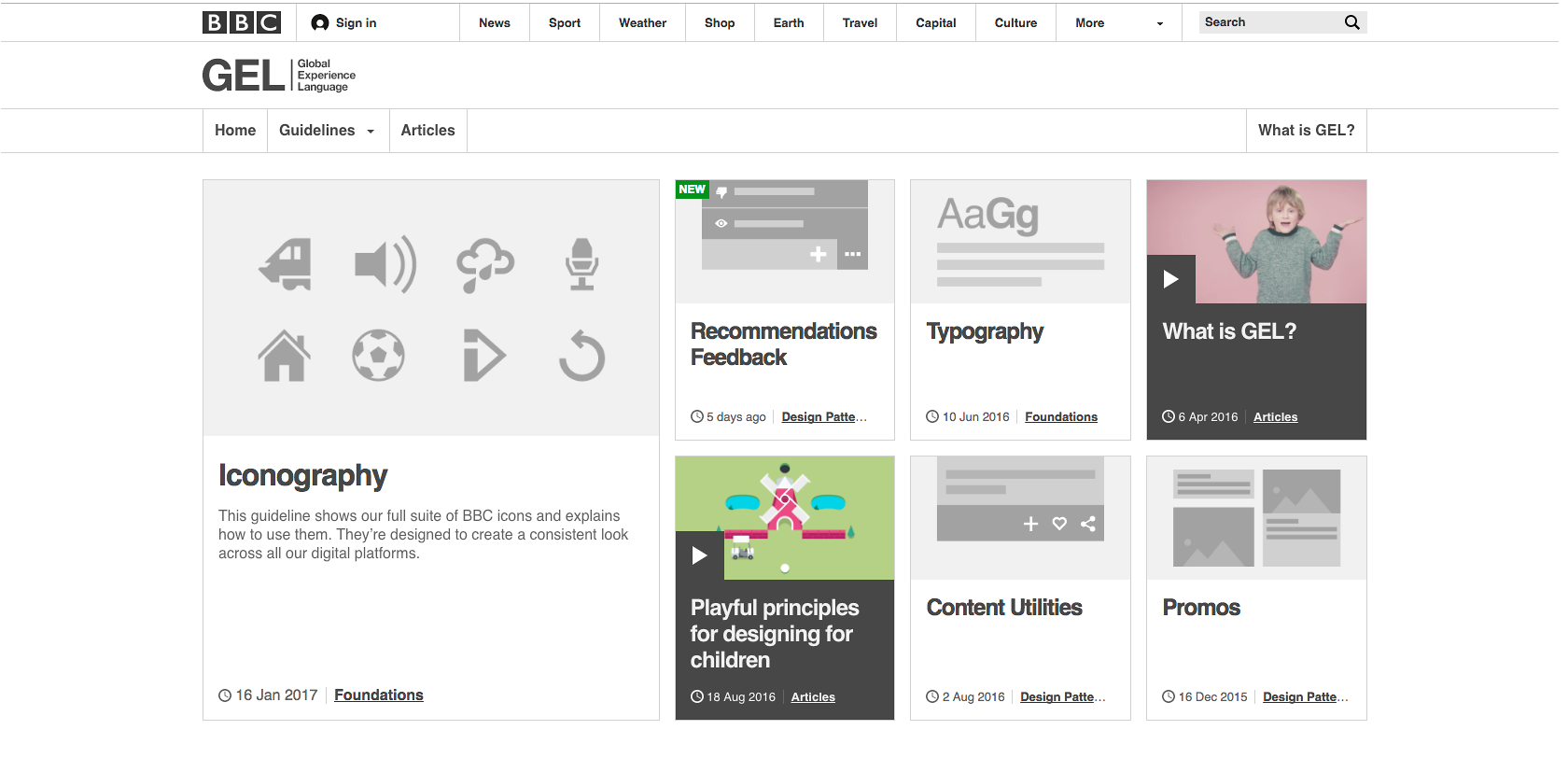
BBC UX design system, styleguide, and component library
The Global Experience Language, (GEL) from the BBC 
explains the purpose of each component and how they 
should be used.

3 Months free Interaction Design Foundation


In recent years, we’ve heard a lot about design systems, styleguides, pattern libraries, and atomic design. While these tools are very useful, using them can seem like overkill when you only want to create a few screens for an MVP or to demo an app. However, having a styleguide will not only improve your design process in general, but will make your app more solid and consistent.
Let’s first talk about the main benefits of a styleguide, and then touch upon the challenging startup environment. Finally, we’ll discuss how a styleguide is always evolving as a living document.

Top Five Reasons Why a Styleguide Is a Good Idea

1. A Styleguide Makes Designs Concrete and Branding Clear

As a lone designer at a startup—which is often the case—there aren’t many opportunities to review and challenge design decisions made by others on the team. Although everyone might be working in collaboration, designs are not necessarily shared with others. This means there is only one person validating final designs.
A styleguide will provide a startup with guidance and documentation for reference. It will challenge some of the design choices made by the designer or the team because they’ll have to be validated in the global context of the app. Designing a UI component because it works well on one screen will not cut it. A well thought-out design should solve a single design problem in one situation, as well as a pervasive problem that is found on other screens of your app.
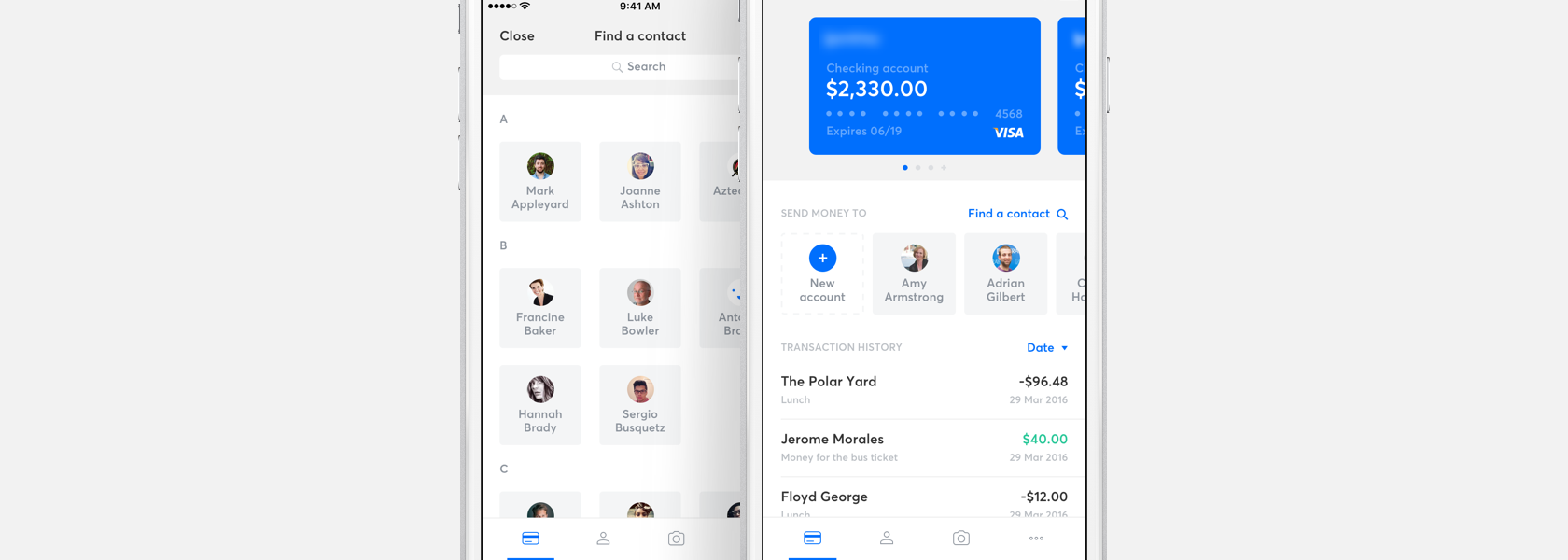
Repeated components in a UI deserve to be in a styleguide.

This app's UI design uses the "contact" tile repeatedly, a prime 
candidate to be included as a component in the styleguide. 
(by Ivan Bjelajac on Dribbble)
A styleguide makes the overall design style, brand guidelines, specifications, and rules available to everyone at your company. It’s only a click away. They can go to a URL to easily access an online styleguide or download a PDF. Design becomes everyone’s job—it is no longer the sole responsibility of the design team. It’s a prudent approach that will improve your product’s user interface.
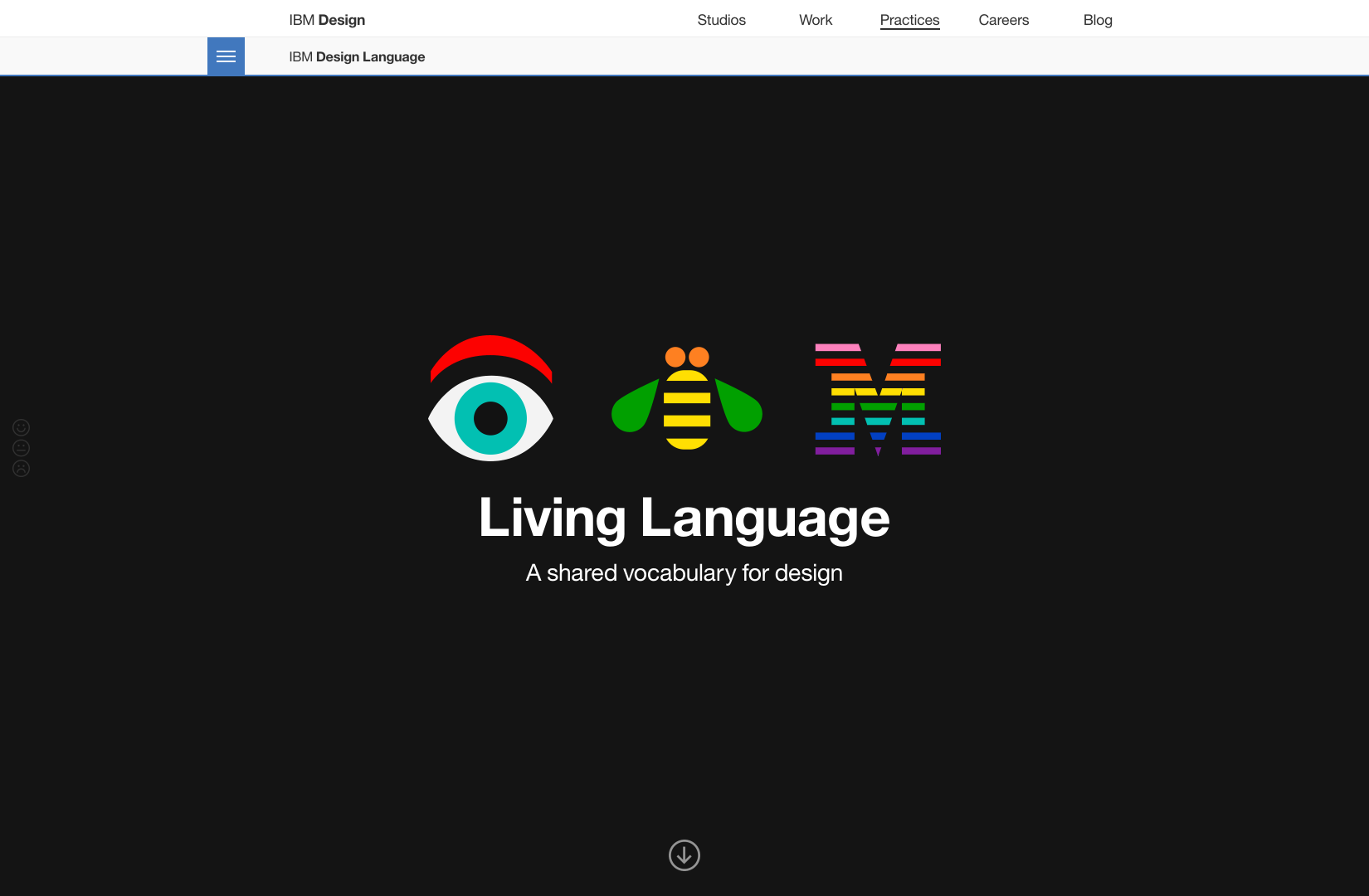
IBM design language guide on the web

IBM hosts their "design language" guide online which makes it easy
for everyone, even the public, to view it.

3 Months free Interaction Design Foundation

2. A Styleguide Makes Your Design More Consistent

It provides a dictionary of sorts for your UI design language. You can use the same terminology when you want to communicate something you’ve already expressed. Imagine if we had slightly different words to express the same thing:
  1. “It’s raining; I need my umbrella.”
  2. “It’s raining, I need my umbrellol”
  3. “It’s raining, I need my umbrellala “
It may make a language poetic, but hard to understand. Fundamentally, it’s the same idea with the UI of a site or an app. For ease of use, you should only invent a new “word” when you’re really creating something new. This way, you’re bound by a strict rule that says, “Only components which solve a design problem repeatedly throughout the product are allowed into the product and subsequently the styleguide.”
Consistency makes your product more user-friendly; a highly usable product can translate into more engagement and sales.
App onboarding screens
Onboarding screens often use animations or visual effects that 
are not present in the rest of the application. It gives designers 
a good opportunity to create a new layout.
(by Murat Gursoy on Dribbble).

Get CPD Accredited Courses at £10

3. Reusing the Same System Components Makes Your App Easier to Use

As in the language example, consistency is key. Once each component is understood by the user, when used again in a different context, people will already be familiar with its behavior. When it comes to user interactions, this consistency improves the overall usability of the product.
Eventbrite's user interface reuses common components.
Eventbrite uses a three-icon layout in a lot of its sections. When a user comes across these components again, they are already familiar with their general behavior.

Working with a component-based design system saves money and also makes a product easier to update. If there’s a usability issue with a component in a certain situation, it can be fixed once and all the other potential issues with that component will also be updated.

ECourses4You

4. A Styleguide Makes Your App Faster to Develop in the Long Run

When your team is developing a common component for a screen, they’re developing a solution that they will also be using elsewhere. This saves development time—a lot of it. When your company scales, this could mean saving as much as 10x the man hours required to build a new screen.

5. A Styleguide Facilitates Production Efficiencies and Innovation

Creating a styleguide makes designs more accessible and readily available to the rest of the company. Developers and designers can prototype an idea faster and more easily. Bootstrap is often praised for making it easy for developers to create a working prototype—your styleguide serves the same purpose. It provides a reference foundation for a new UI that will be built by developers, without the design team having to create the screen first (even though the design team should QA the final screens).
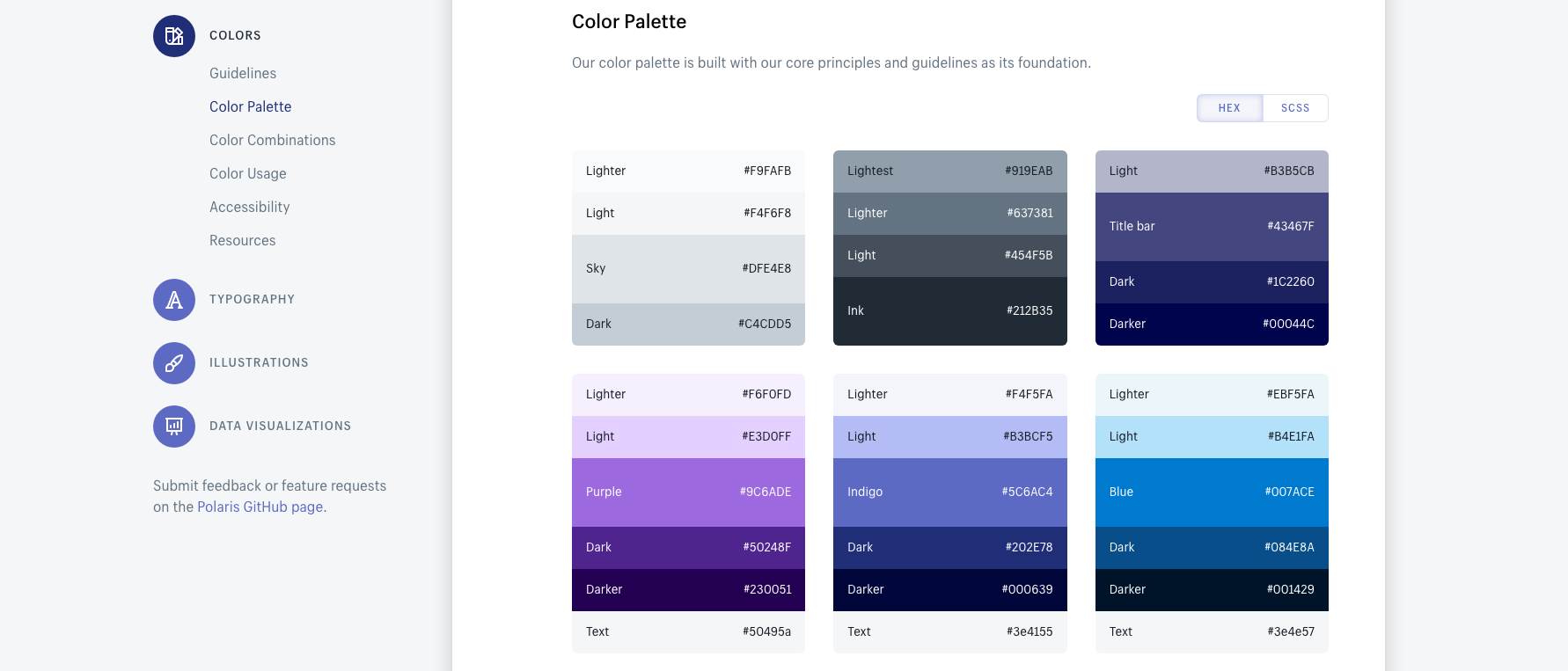
Shopify's design system styleguide
The Challenges of a Startup, a Styleguide in Flux
Creating a design system in a startup environment is not as linear as it might be at a more mature company where they’re used to a more streamlined process. At a more traditional company, the design team performs UX research, ideation, and experimentation, and then comes up with the final brand styleguide. This process does not suit all companies. Startups work in an environment where their vision and the requirements for the product are always in flux. They work with MVPs (minimum viable products), incomplete versions of their apps that are used to test their idea and show its potential to users.
When it comes to creating a styleguide, this can become an issue.
In an environment that’s always evolving, a designer is usually struggling to create a styleguide that’s supposed to be somewhat ‘fixed.’ A designer might not have the time to thoroughly think through all of the components being created, even though they might still end up in the next release of the app. Facebook famously swapped their hamburger menu for a tab navigation when they matured a bit. Do you think whoever put the hamburger menu there in the first place also added it to Facebook styleguide?

Iconfinder 50% off


You might even consider that it’s not yet time to create a styleguide. You may realize that in the long term you’re going to need one, but right now it’s more important to crank out screens for the app’s usability testing. What’s more, you’ll also need some marketing pages to promote your app. Suddenly, your design needs to ramp up, and as you’re creating screens, you begin to see the value of having a styleguide that can keep your designs and the company brand consistent.
The problem is that you don’t know exactly when it’s the right time to trade flexibility for stability. You have to decide when you should start the styleguide and when you should just focus on creating screens. An optimal approach may be to produce a styleguide at the same time you’re delivering screens—this way you may be able to have the best of both worlds.


Top UX Courses at Udemy

Start with Some UI Inspiration

A good way to start, especially if you’re not a designer, is to collect examples of design styles you like, or more importantly, what you think users will respond to. Collect as many examples as possible, and put them in a folder/InVision board/Niice board/etc. They can be used as reference and inspiration along with your design sensibility. You can build on them later to create a pattern library.
For instance, when I was working on a styleguide for a company promoting artists in the entertainment industry, we wondered whether light or dark backgrounds would have a greater impact on our users. I looked at hundreds of different websites in games/movies/visual production to see how they used dark and light backgrounds.
Star Wars Battlefront 2 game website color-scheme styleguide

The Star Wars Battlefront 2 game website uses darker colors while the EA website uses a lighter color scheme.
I made a reference sheet where I highlighted the most common patterns. One pattern I identified was that companies in that industry tended to use darker backgrounds when presenting their products, but used white backgrounds in their marketing efforts, eCommerce, and shops.
You don’t have to go as deep as that, but I found having visual references helps, not only in creating a styleguide, but also in remembering some of the use cases you might need to design for. Once you feel good about the references you collected, you can start working on the visual design.
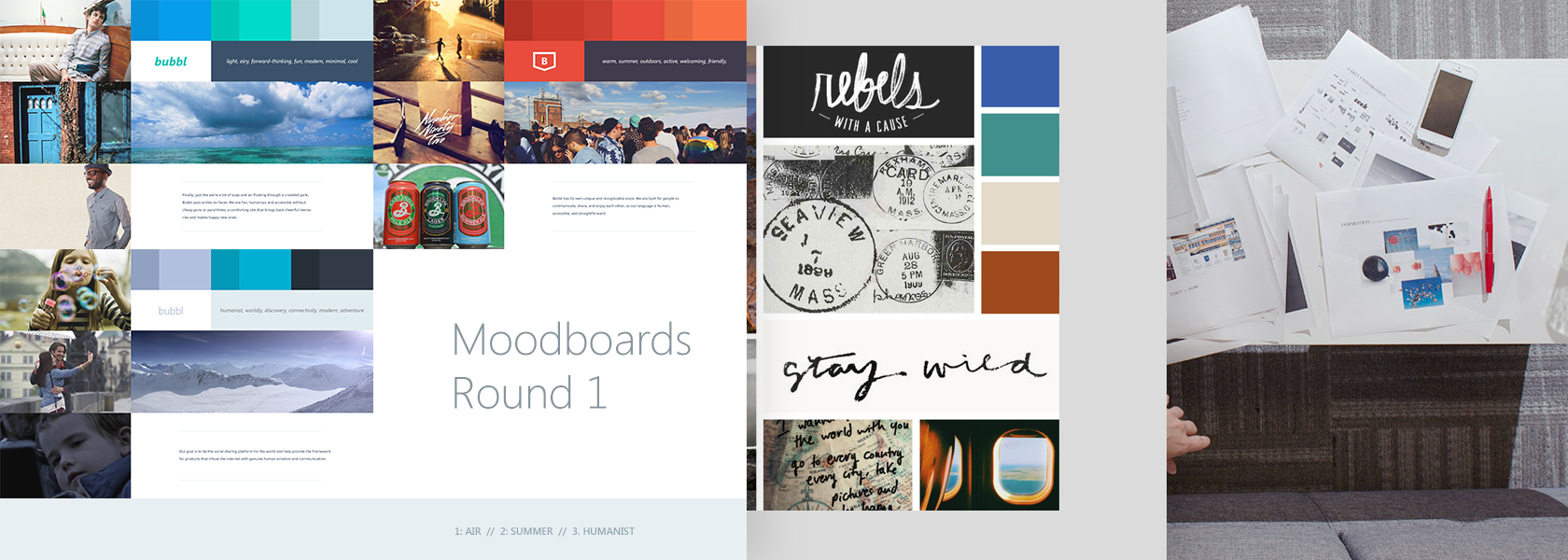
Moodboard

Various mood boards that use different references.
(sources: Summer Teal Simpson HitchVivek VenkatramanAmber on Dribbble)

Design Solid UI Components

While working at startups, it’s harder to create components than it is to create pages—at least at the beginning. When you design a page, you often have an idea of how it’s going to be used. That’s not necessarily the case when you design a component. You’re trying to design for a specific use case, but you want it to be part of a universal design system, and you need to approach it that way. For instance, you may want to create a sub-navigation component with three buttons. You may also need it to work with four, five, or ten buttons, and it will need to work on mobile, tablet and desktop. You need to think ahead.
Styleguide for Operator, an eCommerce company
The Operator styleguide specifies how each of their components react based on navigation and visual hierarchy. (source: Kerem Suer on Dribbble)
You want a certain level of persistence or staying power in a component. Common components shouldn’t change often, and they must be reusable in many places throughout your product. For example, if you’re only interested in an iOS app, then you want to test your component based on the number of options or the length of the content, not necessarily the screen size. The idea is that if it’s viable in the UI in many places in your app, then you know it’s a component that has the potential to be part of your styleguide.
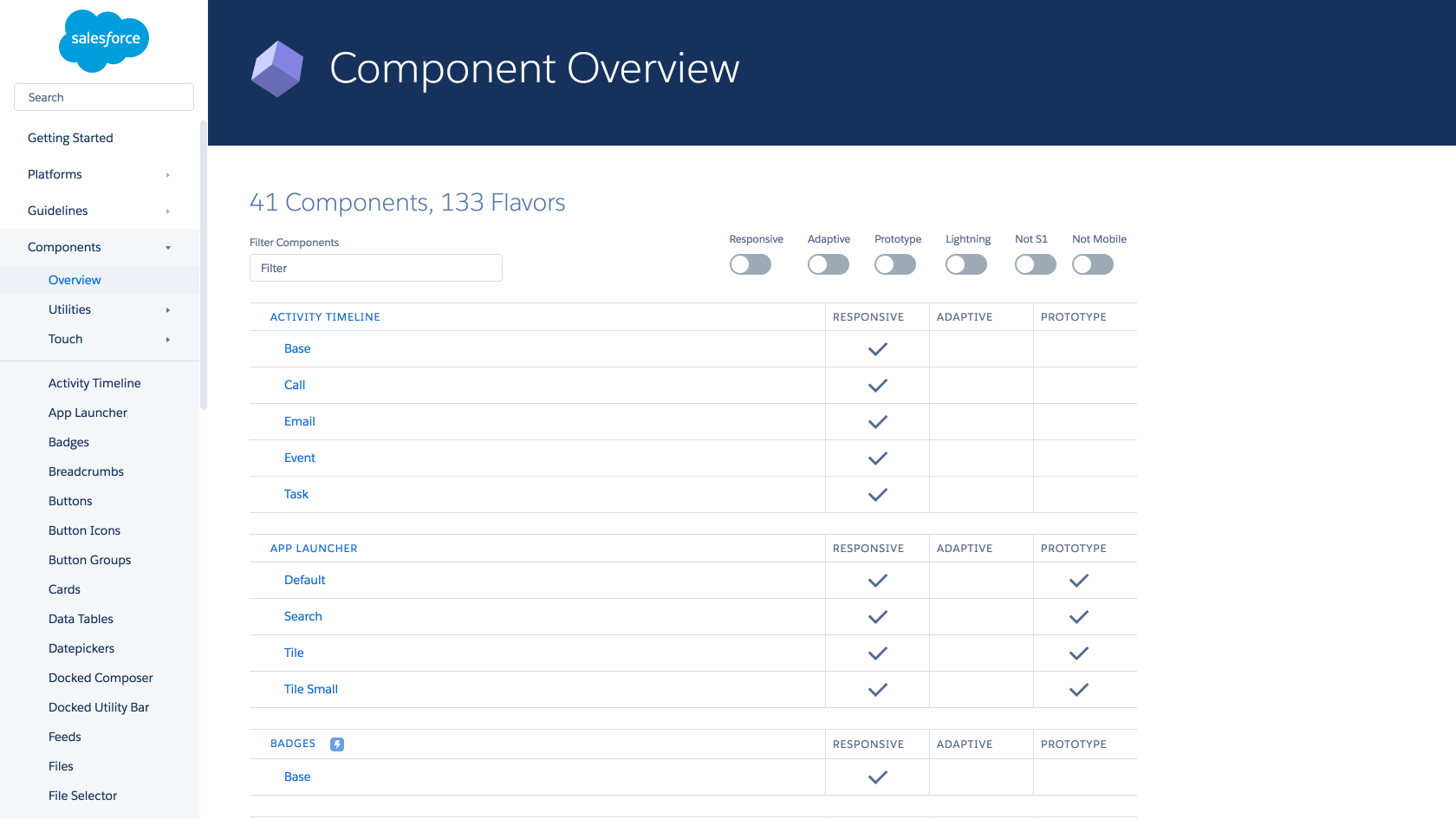
Salesforce design system with common components and their use

The Salesforce Lightning Design System indicates how flexible a component is and whether or not it can be adapted to a mobile interface.


Top UX Courses at Udemy


A startup needs to start from practically nothing and then move quickly. Your boss might want a screen designed by the end of the day. That means you can’t really develop an entire styleguide and then come up with the screen. Even worse, you might be designing a styleguide with components that will never see the light of day because the vision of the company has changed. Like they say, it’s better to ship now.
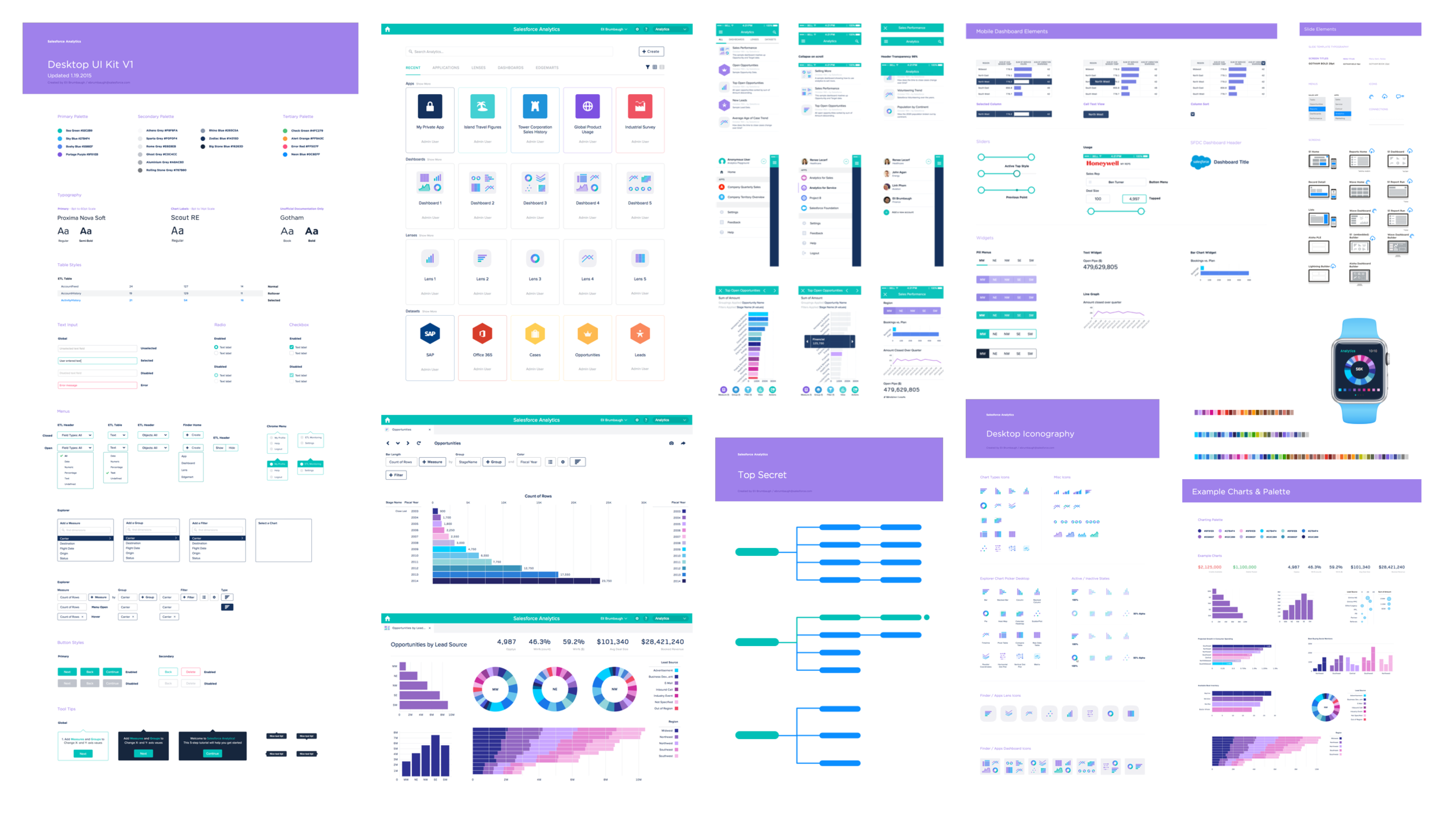
Salesforce analytics UI kit component library

The Salesforce Analytics UI Kit is a library of common components that are supposed to be reused in each app. (source: Eli Sebastian Brumbaugh)
Creating a great styleguide takes time, and because it will become the foundation of your design system, you want to get it right. In a startup environment, you need to work on your styleguide with everything in tandem.

The Styleguide as a Living Document

You should think about your styleguide as a work in progress. Like a startup figuring out its strategy, you’re going to figure out your styleguide as you go along. You’ll edit it and adjust it over time until it becomes the foundation of your UI. One useful approach is to start the first mockup at the same time you start your styleguide. Open two files with your favorite software (in my case, Sketch); one called page name and the other one styleguide. As you’re working on your screen design, you can start seeding your styleguide with the elements that make up your design.
Working on a styleguide simultaneously in Sketch

A startup project example with two files opened. The styleguide on the left and the mobile screen on the right.

Logomaker


As you start doing more of these, you’ll notice early on that there some components are prime candidates for inclusion in the styleguide. For instance, if you’ve settled on an icon style, then all of your icons can go into the styleguide right from the start.
I usually create a section called ‘icons done so far.’ If at one point someone needs an icon, they first have to check through this section before creating a new one.
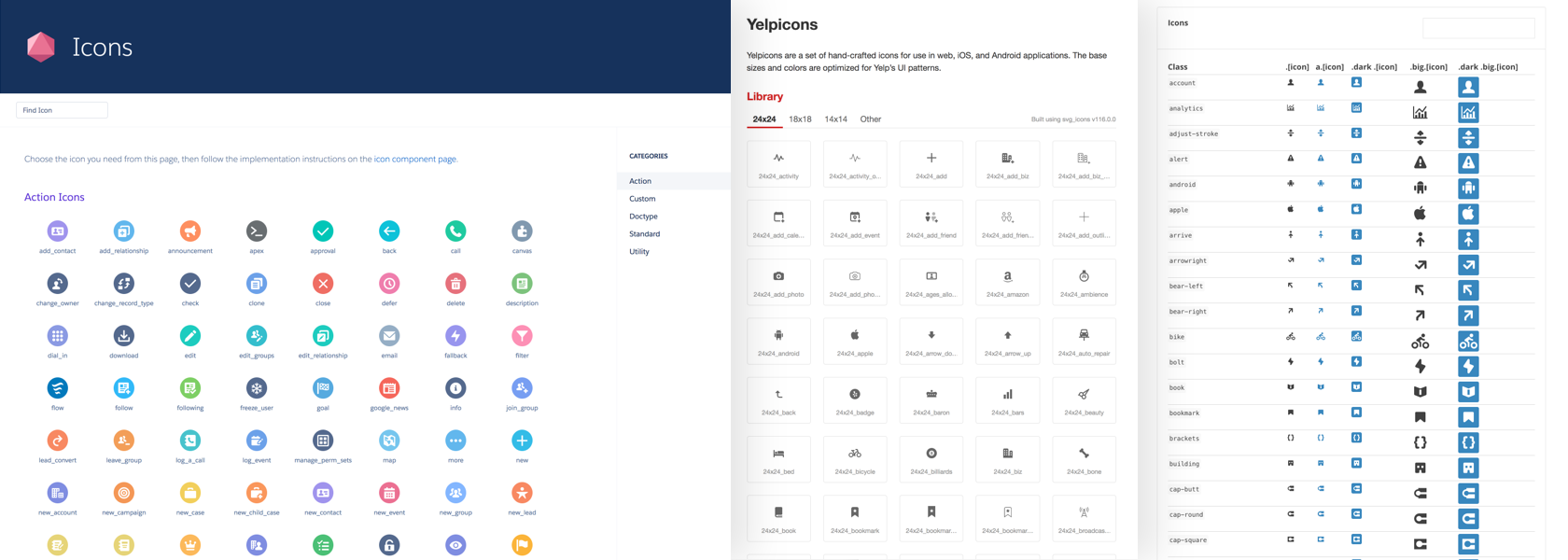
Icon libraries in styleguides and common component libraries


SalesforceYelp and Mapbox all have extensive icon libraries for their app. Your styleguide should also contain UI elements that are used throughout.

Other obvious items to consider are colors, buttons, selectors, titles, headers, body text, etc. If you’re using a style especially for marketing, you can consider putting it in your styleguide and labeling it appropriately. It’s okay if you’re not completely settled on a particular item. You can refine the UI elements in your design system later when the opportunity arises, and update the guide appropriately. Don’t forget, the styleguide is a living document, especially at a startup.
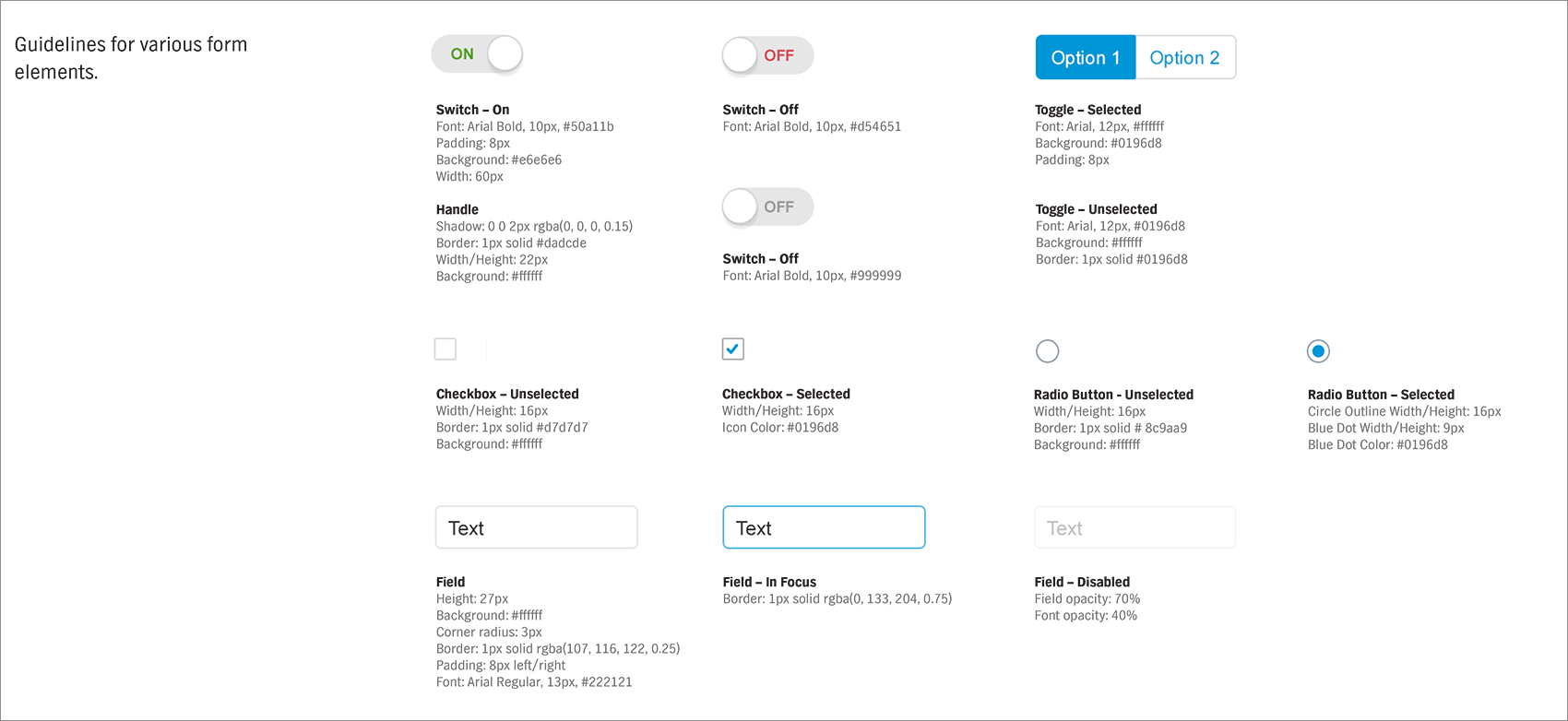
Web form elements in the styleguide
Eventually, when I start putting layouts in the guide, I know that I’m beginning to reach a point where all components should be close to their final state. This part marks the tipping point in the styleguide creation process—now you can celebrate! A good way to celebrate such a milestone is to create a logo or icon (consider naming it) for the 1.0 version of the styleguide.
Some people go as far as printing the logo/icon as a sticker so the team has a sort of trophy. That’s also the point where I usually go back to the more traditional way of working with the guide by opening that styleguide first, and then creating a new file for whatever interface needs to be done.

Conclusion

As a designer, by creating a styleguide as early as possible, you’re making sure that your startup adheres to a higher standard of quality. It may be challenging, but it’s well worth the effort. A solid, well-rounded styleguide is not only going to help you have a better product, it will also help you reduce the cost of development.
There is a way to make it happen even in a fast-paced environment where quick decisions are made and sometimes designs need to change rapidly. Hopefully, the process described above will help designers at any startup cope with the challenges of complexity and speed while also creating a sturdy styleguide for the benefit of the product.

3 Months free Interaction Design Foundation


Share:
Continue Reading →