Showing posts with label UCD. Show all posts

Saturday, 1 February 2025

USE CASES in UX


Use cases flow chart


Image by Gerd Altmann Pixabay

Updated on 4 Feb 2025 

An Introduction


A “Use case” is a term used widely in various contexts. In business, it is often used in reference to a business case, a process or a scenario that can be implemented as a product or part of that product. Referring to the context of User Experience (UX), a Use Case is a documentation highlighting the possible interactions between the users and the system.
Use Cases give us a precise idea about how the users should be able to make use of the product or application for the completion of the task. A Use Case depends on the “User Action” and the corresponding “System Response” to that particular action. It is a document that serves to highlight the set of actions that a user performs to achieve certain goals and the responses received from the system to the user’s action.
Use Cases in UX are an important tool for performing user research and user experience design. In a design-focused development environment, they serve to highlight the purpose and objectives of a system and its associated user roles by depicting a sequence of steps performed and the interactions towards a common, specific goal.


Importance of Use Cases

Use Cases are important because they provide information about how a system responds while it is used. They describe how the system helps the users achieve their goals. Contrary to a User Scenario, a Use Case is more orientated towards the behavior of the system rather than the user. In a Use Case, a comprehensive set of goals can be defined and an analysis can be performed as to how expensive and extensive it is vis-à-vis resource procurement, deployment and utilization to achieve the goals. In projects, Use Cases are helpful in analyzing which areas of the system need to be focused and developed and what setbacks could possibly occur while performing a task.
It is a user-centric approach: One has to state “what actions will be performed by the user” and “what result will be displayed by the system”.
It is not a system-centric approach: One does not have to specify “what inputs are fed to the system” and “what is its corresponding output”.


Share:
Continue Reading →

Thursday, 7 January 2021

Participatory Design: What it is, and what makes it so great

Participatory Design
Participatory Design (in its origins also called co-operative design) is a relatively new approach to designing products. It successfully involves the stakeholders, designers, researches and end-users in the design process in order to help ensure that the end product meets the needs of its intended user base.
Participatory Design exercises are used in a variety of fields, such as software and product design, urban design, architecture, graphic design and even medicine.
Up until recently, majority of consumers believed they were not being designed “for” by the companies they bought their products from, but rather designed “at” and forced to adapt to the ideas and principles that weren’t intuitive to them. In order to fix this, Participatory Design was a creative invention which aimed to actively include the end users into the design process.

As opposed to empathic design, in which researches and developers move into the world of end-users, Participatory Design can be seen as relocating end-users into the world of research and development.
It is important to note that, while the users are a valuable source of information and ideas in Participatory Design, they are not allowed to make end decisions and are never empowered with the tools that the experts use. Participatory Design sessions are simple exercises in which we give our users the tools to create and design mockups of software or products they would love to use in the “perfect world” scenario, while also asking them to explain why they built their perfect software or a product in that particular way.
From observing their building process and listening to their explanations on why they built something in this or that way, we learn a lot of the things we wouldn’t through a mere interview with the user.

When should you run a Participatory Design session?

  • ·       When you want to better understand how people think about a given problem, discipline or a technology, run a Participatory Design session.
  • ·       When you have a feeling that what the users say they do and what they actually do are not the same, run a Participatory Design session.
  • ·       When you feel like there is, or could be, any cultural or political disconnect between you and the end user, a technique such as this might be the best way for you to observe and learn from the user.


The tools

At this point, you might be thinking to yourself, “A Participatory Design session sounds great! I want to conduct one, but which tools do I need?” You will be happy to find that nothing is set in stone when it comes to the tools you should use in Participatory Design sessions.
…Unless you want to provide your participants with stone blocks and rocks, which is totally fine, and sounds like a great idea!
Depending on what you are designing, tools for the session can be anything. If you are working on designing a product or an environment, you might want to use wooden bricks, Legos, plasticine, pieces of rope, maps and so on. Even post-it notes can be used successfully and in a variety of different ways.


One of the great things about Participatory Design exercises is that the only limitation when it comes to the tools used is your imagination.
If you are designing software, you might decide to stick to pen and paper. (Or a whiteboard!) You could create blank versions of different device screens and ask participants to draw out the UI. You could provide the participants with cut out icons and boxes which they can arrange to their liking and according to their needs, all the while explaining why they put something in one place instead of the other.
DISCLOSURE: This post may contain affiliate links, meaning when you click the links and make a purchase, we receive a commission.

Top UX Courses at Udemy

By letting the participants show us what matters to them, as opposed to telling us, we are getting more specific and more honest data out of the session.

In conclusion

A Participatory Design Session is a great opportunity for designers and researchers to meet and identify with the end-user. The user is invited to enter the creative process and by listening to them we can avoid making mistakes we are often tempted to make as a result of designing for ourselves instead of designing for the user.It is important to try and keep the tools used as simplistic as possible. Don’t let the tools you use overshadow the message your participants are trying to get across. Ask a lot of questions, and as with any usability research technique, make sure to spend the most of the session closely observing your participants.

References : View Original link to article

About Author:

Ines Anić (@i_anicis a Content and Administrative Associate at UX Passion, where she writes about UX, UI, design and social media management. She is passionate about UX, Usability, design and video games; and curious about technology, gadgets, IT and the world of startups. Ines is looking forward to connecting with you on LinkedIn and Twitter!

Share:
Continue Reading →

Friday, 15 May 2020

Understand and Apply Lean UX approaches for Agile environments


Agile development methods, such as Scrum, have challenged UX experts to adapt. In this article, we will study lean UX and the way to practice Lean UX principles and methodologies inside Agile environments and efficaciously work with teams. This article is just an overview on Lean UX and its adaption in agile environment. If you want to gain in-depth knowledge on this topic, I highly suggest you to read Lean UX if you haven’t yet.


What is Lean UX

Lean User Experience (Lean UX) design is a design management mindset, culture, and a framework that embraces Lean-Agile strategies. It implements functional capability in minimum viable progression and determines victory by measuring results against a hypothesis. Lean UX design extends the traditional UX position past simply designing elements and foreshadowing how users might interact with a system. Rather, it encourages a far more comprehensive view of why a feature exists, the functionality required to enforce it, and the advantages it delivers.

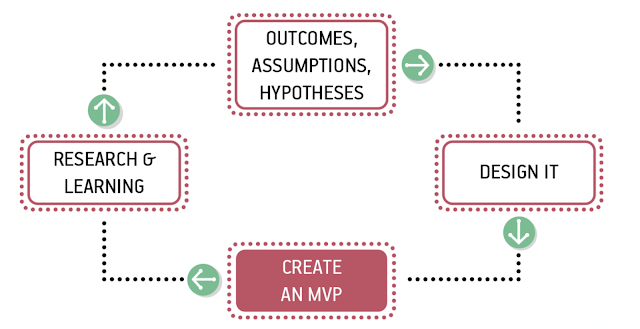
In Lean UX: Designing Great Products with Agile Teams, Gothelf and Seiden [1] describe a model that we have adapted to our context, as Figure 1 illustrates.

The Lean UX Process

Figure 1 The Lean UX Process (adapted from Ref [1])


The book also lists the foundation for precise methods in which groups cope with their UX process, and introduced a system that emphasizes the following:

1.    Removing waste
The system seeks to cut through common, time-consuming tactics like frequent documentation by creating minimal viable products that drive learning quickly.

2.    Constant collaboration
Lean UX brings together teams from “designers, developers, product managers, quality assurance engineers, marketers, and others” through frequent contact and communication. - Lean UX

3.    More experimentation
Designers leverage rapid experimentation with their designs to uncover more grounded information and lessons on their products. - Lean UX

3 Months free Interaction Design Foundation

 “This reframing requires an organization-wide position of humility. It requires teams and managers to use their knowledge and skills and creativity as scientists might: they propose their best solution and then they test to see if they’re right.” – Lean UX

For a design management mindset to be effective all members of your organization need to be on board and understand Lean UX for it to be effective. The core of Lean UX boils done to the following principles:


Outcomes, Assumptions, and Hypotheses

The Lean UX technique starts with writing a hypothesis: Agile teams and designers apply Agile methods to keep away from Big Design Up-front (BDUF) and focuses on creating a hypothesis about the feature’s anticipated business result, and then implement and test that hypothesis gradually. Where maximum software creation teams focus on features and deliverables, Lean UX shows a light on the outcomes of the product and how they benefit (or don’t benefit) the user in an incremental manner.

This includes turning your assumptions into hypotheses statements. For example:
We believe are users are service Engineers who don’t need any technical help/support with managing our HVAC system. We will know we’re right if we see a decrease or clearly no service related queries over any communication platform.


Collaborative Design

Traditionally, product success was measured by how well the executed user interface complied with the initial UX design. In Lean UX, this changes adequately: “Lean UX literally has no time for heroes. The entire concept of design as a hypothesis immediately dethrones notions of heroism; as a designer, you must expect that many of your ideas will fail in testing. Heroes don’t admit failure. But Lean UX designers embrace it as part of the process.” – Lean UX

Continuous observation and scrutiny takes the hypothesis and expedite a continuous and collaborative process that ask input from a numerous group of stakeholders – Architects, Customers, Business Owners, Product Owners, and Agile Teams. This further refines the problem and creates design that clearly express the emerging understanding including personas, empathy maps, and customer experience maps. This significantly improves business outcomes and time-to-market.


Build MVP: Minimal Viable Product

With a hypothesis and design in place, teams can continue to enforce the functionality in a Minimum Viable Product (MVP). The MVP should be the minimal functionality that the teams can develop to learn whether the benefit hypothesis is valid or not. Teams may additionally select to keep options with Set-Based Design, as they define the initial MVP. In few cases, early designs could at first be extremely lightweight and not even functional (ex., paper sketches, low fidelity mockups, low fidelity prototypes) to test the design architecture and get rapid feedback. You need to develop your MVP primarily based on your assumptions and hypotheses. Your target audience’s response and feedback to your MVP will provide you the maximum insights into whether you’re on the right track.


Research, Learning & Evaluate

Is your product giving your users what they need? What needs to be modified? There are a spread of methods to determine if the feature provides the right outcomes. These include:

1.    Observation – Wherever feasible, directly observe the actual usage of the system by the users, it’s an opportunity to understand the user’s context and behaviors.

2.    User surveys – When direct observation isn’t possible, a simple end-user questionnaire can reap fast feedback.

3.    Usage analytics – Lean-Agile teams build analytics right into their applications, which helps validate initial use and provides the application telemetry needed to support a Continuous Delivery model.

4.    A/B testing – Is a form of statistical hypothesis comparing two samples, which acknowledges that user preferences are unknowable in advance.

Measurable results deliver the knowledge teams need to refactor, adjust, redesign—or even pivot to abandon a feature, based solely on objective user data and user feedback, driven by actual evidence of whether a feature fulfills the hypothesis, or not.

Evaluation requires two things to be effective in Lean UX:

1.    Continuous
Bake “small, informal, qualitative research” techniques into every sprint. - Lean UX

2.    Collaborative
Teams must work cross-functionally instead of in individual silos to “build shared understanding” - Lean UX


Top UX Courses at Udemy


Fitting Lean UX Principles and Methodologies within Agile Environments

Agile methodologies are focused on developers. They emerged because of the programmers’ attempts to solve common pain points experienced during software development projects. Notoriously, the Agile Manifesto (still the primary document delineating Agile principles) is not inclusive of UX people, nor did it account for the time, resources, and research that UX experts require in order to build aesthetically beautiful designs which is user centric.

Aligning and incorporating UX process into an Agile environment is a tough challenge. Under an Agile paradigm, the entire team works on the same features of a project simultaneously in order to avoid “throwing it over the fence”. The work is done in “sprints” — commonly 2-week periods when the team focuses on certain features, and then moves on to next. As a result, designers are under great pressure to design, evaluate, refine, and deliver their deliverables unrealistically fast, and with little of the context and big-picture thinking that suits consistent, user-centered designs.

However, all isn't always misplaced! Over the years, a few common practices have emerged from conversations with those who have successfully embraced an Agile workflow. We’ve found some useful ways to integrate Lean UX approaches with the flow of Scrum. Let’s take a look at one of such efficient process by Jeff Gothelf and Josh Seiden how where you can use Scrum’s flow and Lean UX in parallel.


Create a Theme with Hypothesis

Scrum has a lot of meetings and if you use them as mileposts during your sprint planning you can create an integrated Lean UX and Agile process in which the entire team is working on the same thing at the same time.

Start with choosing a hypothesis as the early focus of your project to create a theme that guides the work you’ll do over the next set of sprints, as demonstrated below


Sprints tied together with a theme


Figure 2 Sprints tied together with a theme


Commence the Theme with a Design Sprint

Once you have finished breaking down your hypothesis into themes, start work on each theme with some version of Design Sprint. Based on the scope of the hypothesis, the design sprint can be as short as a day or as long as a week. You can do them along with your immediate team but should include a broader group if it’s a larger-scale effort. The point of this kickoff is to get the entire team sketching, ideating, and speaking to customers together, creating a backlog of thoughts and ideas from which to validate and learn.


Get CPD Accredited Courses at £10


After you’ve started your regular sprints, your ideas will be tested, validated, and developed: new insights will come in, and you’ll need to decide what to do with them. You make these decisions by running following shorter brainstorming sessions and collaborative discovery activities before each new sprint begins. This allows the team to use the latest insight to create the backlog for the next sprint.


Timing and scope of design sprints


Figure 3 Timing and scope of design sprints


Iteration Planning Meeting

Bring the deliverables (can be as small as low fidelity design or prototypes) of your design sprint to the iteration planning meeting (IPM). Your mess of sketches, wireframes, paper prototypes, and any other artifacts might seem useless to outside observers or the business at this moment but will be meaningful to your team. You made these design deliverables together and because of that you have the shared understanding necessary to draw stories from them. Use them in your IPM to write user stories together, and then estimate and prioritize the stories.


Hold iteration planning meetings immediately after brainstorming sessions


Figure 4 Hold iteration planning meetings immediately after brainstorming sessions


3 Months free Interaction Design Foundation


User Validation Schedule

To ensure that you have a continuous stream of user feedback to use for your experiments, plan user research sessions every single week. If you don’t have enough resources to start testing, start small. Use the artifacts you created in the ideation sessions as the base material for your user tests. Include different members of teams to test your design. This way your team has ample time to react prior to the end of the sprint. This weekly research provides a good flow for your experiment stories as well as a natural learning point in the sprint.

Remember that when the ideas are raw, you are testing for value (that is, do people want to use my product?). After you have established that there is a desire for your product, subsequent tests with higher-fidelity artifacts will reveal whether your solution is usable.

Conversations with users happen every week


Figure 5 Conversations with users happen every week


Participation

Agile methods can impose a lot of time pressure on designers. Some work fits smoothly into the context of a user story, but other work might need more time to get right. Two-week cycles of simultaneous development and design offer a very few opportunities for designers to focus on big problems.

The major reason designers feel pressure in Agile processes is because they don’t (for whatever reason) fully participate in the process. When Agile is understood as simply a way to build software (mostly technical part), there doesn’t appear to be any reason to include non-technical people in the process. However, without designer participation, their concerns and needs are not considered in project plans. As a result, many Agile teams don’t make plans that allow designers to do their best work which also results in sprint failure.

For Lean UX to work in Agile, the entire team must participate in all activities—stand-ups, retrospectives, IPMs, brainstorming sessions—they all require everyone’s attendance to be successful. Besides negotiating the complexity of certain features, cross-functional participation allows designers and developers to create effective backlog prioritization.

Teams make decisions in meetings. Those decisions are based on discussions. Even if 90 percent of a meeting is not relevant to your immediate need, the 10 percent that is relevant will save hours of time downstream explaining what happened at the meeting and why certain decisions were made.

Participation gives you the ability to negotiate for the time you need to do your work. This is true for UX designers as much as it is for everyone else on the team.


FutureLearn US


Conclusion

While there are plenty of great benefits to Lean UX, there are five that might sway you to trying it out for yourself:

·      Increased collaboration

·      Improved outcomes

·      Streamlined feedback process

·      Reduced time-to-market

·      Strengthened user research

It’s challenging to make UX and Agile work together, and if you’re an UX person struggling with aligning your UX process with Agile, you’re not alone. Typical Agile processes don’t consider the time, resources, and scope that UX designers want in order to deliver user-centric products.  Despite that, UX and Agile can coexist well. At the end of the day, it’s our goal to provide products to people that they want to use and are easy to use. Lean UX takes us on a path to get there in a way that’s efficient, collaborative and fast.


References:

https://www.scaledagileframework.com/

Lean UX: Designing Great Products with Agile Teams


Share:
Continue Reading →

Monday, 4 May 2020

How to choose Usability Testing Method and protocol

Usability Testing
Usability testing method uncovers the problems in product or design using Participants activity into account and analysis with respect to identified use cases. A Usability Testing session can generate both qualitative and quantitative observation data which can processed further to reach on findings. The generated data from Usability Testing session is mainly dependent about the type of method and protocol chosen. If correct method and protocol is not chosen and executed, it may hamper the accuracy of data gathered and which may lead to inaccurate or biased findings. In this article, I would like to discuss about the type of Usability Testing methods, protocols and a small guide on when to use it. This would help you in understand and decide the method for better execution and accurate findings.

There are different ways to classify the Usability testing methods. When it comes to choose the Usability Testing method, one need to have answers of 3 parameters:
1. Context
2. Way
3. Protocol


1. With respect to Context

 a. In-Person Usability Testing

In-person Usability Testing getting conducted in controlled or semi controlled testing environment. In that testing environment test Participant and Moderator will be present, apart from these actors some more roles can also be physically present like observer, note taker, business stake holders, project management team etc. Special environment setup is used for this kind of testing but not mandatory to have such infrastructure and setup. This can also be executed in any place with product, Moderator and Participant.

b. Remote Usability Testing

Remote usability testing is similar in fashion except one fact that is Participant and Moderator are not present at the same place instead this testing gets conducted by Participant alone and Moderator may or may not present through digital channels. This method is very impactful when the location or travel constraints are there in product lifecycle. Remote Usability Testing tools can be used in this method like Crazyegg, Maze, UserZoom etc.


Usability Testing Template

2. With respect to Execution method

 a. Moderated Usability Testing

This way of Usability Testing gets moderated by a Moderator or Facilitator who is expert in conducting & executing the studies, probing, observation skills etc. Moderator interacts with the Participants for explaining the tasks, probing and clarifications. The main goal of Moderator is to control the study and drive in correct directions. This method is amazingly useful in conducting Usability Testing in early design process and gather qualitative data which can help in making product more efficient by applying the insights as design iterations.

b. Un-moderated Usability Testing

On the contrary, unmoderated Usability Testing are not controlled by Moderators or facilitator. The test Participants are provided the list of tasks and testing materials. This is primarily used when the primary goal of Usability Testing is to measure some parameters and prove some hypothesis quantitatively. This kind of Usability Testing majorly done through online Usability Tools, which captures the Participants activity and provide the quantitative data analysis.


3. With respect to Protocol

Protocols define the way the Usability Testing session gets executed. The key activities are probing and think aloud, these activities are mainly configured or define with respect to the goals of observation. Let’s look the protocols in detail.  

a. Concurrent probing

In this protocol, Moderator interacts with Participants while he/she performs the task and along-with the task goes. This method is good in clarifying granular level of details, whereas while measuring any quantitative parameter this way of execution may lead to erroneous results.

b. Retrospective probing

In this protocol, Moderator only observes the activity of Participant when the perform task and once the task(s) is completed Moderator performs the probing. In this way the Moderator does not interrupt the Participant in their task execution and measurable parameters gets more accurate values, whereas the Moderator might miss some key points to clarify or probe while waiting till the last.


Usability Testing Template


c. Concurrent think aloud

In this protocol, the Moderator directs the Participants to think aloud their activities, decision making etc. while they perform the tasks. This is one of the best ways to capture the key qualitative insights about product from end user. Whereas, sometimes it may also lead into the direction of more discussion rather than actions. The Moderator should be skilled well to get the session execution is correct direction.

d. Retrospective think aloud

In this protocol, the Moderator directs the Participant to narrate his/her approach, decision making, activity etc. post the task execution. By this way the task attempt is well performed without interruption whereas, sometimes this method provides artificial data as compared to natural.

Conclusion

Usability Testing in design process is a structured and scientific method, which has many different ways to execute and solve different problems. Every way of execution solves different needs to product which makes it really important to choose the right method at right context. Conduction Usability Testing is good but conducting it in correct way is really important.  


About the Author

Abhishek Jain
Design Lead UX Researcher
KPIT Technologies


UX EBOOK FREE
Share:
Continue Reading →

Thursday, 26 April 2018

The business value of UX design

What do your friend's startup, your small local business and a large company such as Google have in common? No, this isn't a trick question.

The answer is actually fairly simple and intuitive. All of the aforementioned businesses depend on users enjoying their products and services in order to continue doing business successfully.
In the recent years many have noticed the importance of UX design and are investing more and more into its research and development.

Be it physical or digital, a product is bound to rouse both an emotional and intellectual response in its consumer based not only on the way it works but also how it looks and feels. Whether that experience is going to be a good one or a bad one is going to make an effect on your sales, and this is exactly where a good UX design team proves itself to be absolutely crucial. 


Why “X” marks the spot

UX design is about two things only – the User and the Experience. Give your users a positive experience and they will reward you with their trust and their business. Companies with highly effective UX have increased their revenue  by 37%, and top 10 UX leaders in America outperform the S&P with close to triple  the returns - a significant lead.


UX EBOOK FREE


When experiencing your product leaves the user with a foul taste in their mouth, they will quickly take their business elsewhere. 90% of users reported they stopped using an app due to poor performance, and 86% deleted or uninstalled an app as a result of encountering problems with it's functionality or design. Studies show that 86% of users think that an exceptional customer experience is worth paying extra. With these figures in mind, it is not difficult to understand why user experience focused companies like Apple, Google, Adobe, Dropbox and Amazon are year after year leaders of their respectable fields.

While having a great product is paramount, in today's market it often is not enough to keep you ahead of the curve.

This is why investing into UX design has proved to be a game-changing strategy.  A pleasing UX has been proven to earn the users' interest, business, and most of all – their loyalty. 48% of users say that arriving on a business site that isn't working well on mobile will be seen as an indication of the business simply not caring, and 52% said that a bad mobile experience made them less likely to engage with a company in the future.

The principle extends beyond just mobile devices; 40% of users will abandon a web page if it takes more than three seconds to load, while 79% will search for another site to complete their task.

Designing experiences

But what about design? How important is actual aesthetic property of your website (or a product) when it comes to user experience?

An experiment conducted by M. Tractinsky tested relationships between users' perceptions of a computerized system's beauty and its usability.
Its outcome showed that, undeniably, the role the aesthetics plays in HCI design is a major one, and should be kept in mind at all times when catering to the users' needs.


It seems safe to conclude that the business value of UX design is so colossal, one can simply not afford to ignore the importance of a highly skilled team of UX designers putting their expertise into crafting the experience your users are going to undergo and enjoy while engaged with your service or product.

Engaging and connecting with the users is what every company should strive toward, and what good UX design helps you achieve. With design focused on UX, a company is forced to create for their customer. A relationship is formed and it grows, bonding the customer with the product.

References: View original link to article

About Author:

Ines Anić (@i_anic) is a Content and Administrative Associate at UX Passion, where she writes about UX, UI, design and social media management. She is passionate about UX, Usability, web design and video games; and curious about technology, gadgets, IT and the world of startups. Ines is looking forward to connecting with you on LinkedIn and Twitter!


UX EBOOK FREE

Share:
Continue Reading →